
AZ-500 · Question #144
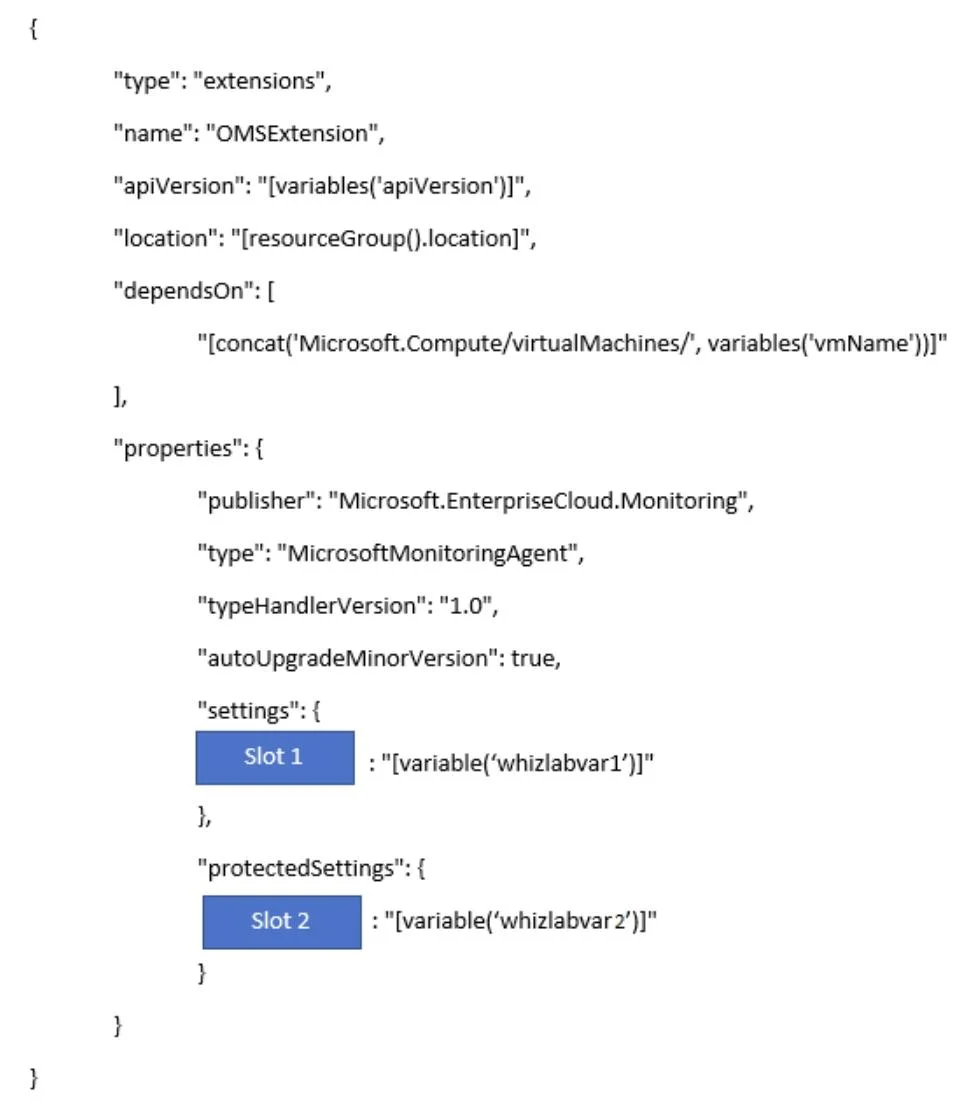
Your company has a set of 50 Windows Azure virtual machines. They all run Windows Server 2016. You have to automate the deployment of the Log Analytics virtual machine extension on the virtual…
The correct answer is D. "workspaceKey". Explanation Option D, "workspaceKey", is correct because the Log Analytics VM extension ARM template requires two critical settings in its protectedSettings block: the workspaceId (which typically goes in Slot1) and the workspaceKey (a secret authentication key used to securely…
Question
Exhibits
Options
- A"workspaceId"
- B"workspaceName"
- C"workspaceURL"
- D"workspaceKey"
How the community answered
(36 responses)- A8% (3)
- B3% (1)
- C14% (5)
- D75% (27)
Explanation
Explanation
Option D, "workspaceKey", is correct because the Log Analytics VM extension ARM template requires two critical settings in its protectedSettings block: the workspaceId (which typically goes in Slot1) and the workspaceKey (a secret authentication key used to securely connect the VM to the Log Analytics workspace). The workspaceKey is placed in protectedSettings rather than public settings because it is sensitive credential data that must be encrypted.
Why the distractors are wrong:
- A ("workspaceId") is a valid property, but it belongs in Slot1 (the public settings block), not Slot2 - it's the identifier, not the secret.
- B ("workspaceName") is not a required parameter in the Log Analytics extension template at all; the extension uses the ID and key, not the human-readable name.
- C ("workspaceURL") is not a recognized property in the Log Analytics VM extension template configuration.
Memory Tip
Think of it like logging into a system - you need a username (workspaceId) AND a password (workspaceKey). The key always comes second and is always kept secret (in protectedSettings), making it the natural fit for Slot2.
Topics
Community Discussion
No community discussion yet for this question.