
AZ-500 · Question #115
Hotspot Question You are configuring just in time (JIT) VM access to a set of Azure virtual machines. You need to grant users PowerShell access to the virtual machine by using JIT VM access. What…
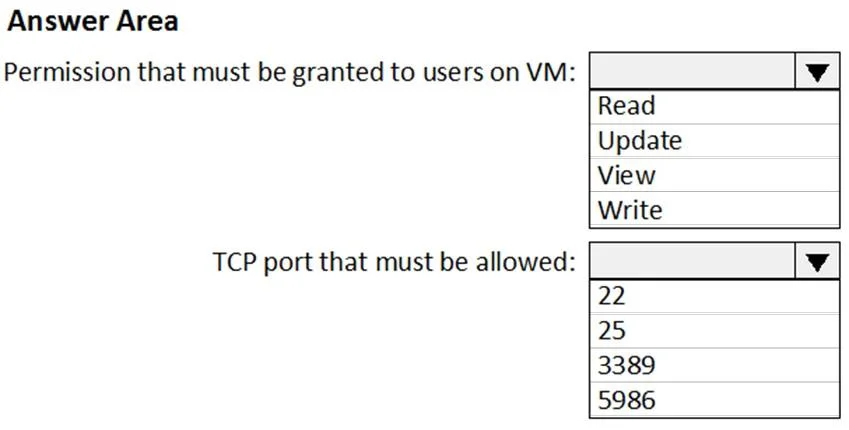
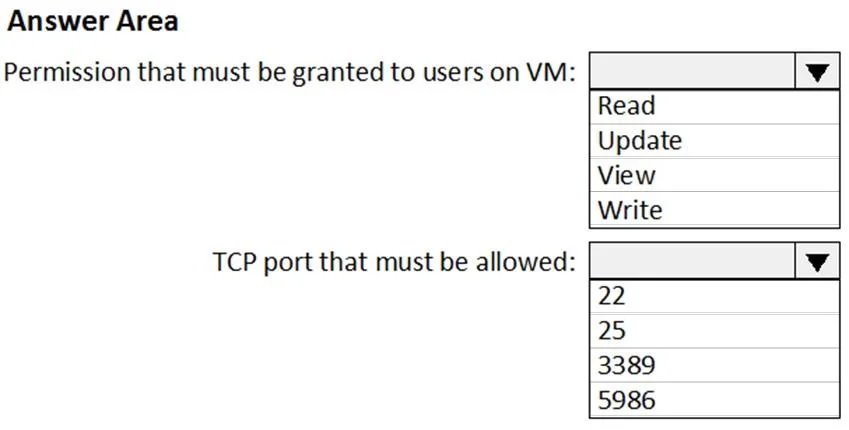
The correct answer is Permission that must be granted to users on VM:: Write; TCP port that must be allowed:: 5986. This question tests your knowledge of configuring Just-In-Time (JIT) VM access in Microsoft Defender for Cloud, specifically which port and protocol must be configured to allow PowerShell remoting access to Azure VMs.
Question
Exhibits
Answer Area
- Permission that must be granted to users on VM:WriteReadUpdateViewWrite
- TCP port that must be allowed:5986222533895986
Explanation
This question tests your knowledge of configuring Just-In-Time (JIT) VM access in Microsoft Defender for Cloud, specifically which port and protocol must be configured to allow PowerShell remoting access to Azure VMs.
Approach. To grant users PowerShell access via JIT VM access, you need to configure Port 5985 or 5986 (WinRM ports) for Windows PowerShell Remoting. Port 5985 is used for HTTP (unencrypted) WinRM connections, while Port 5986 is used for HTTPS (encrypted) WinRM connections. In the JIT VM access policy configuration, you would set the Port Number to 5986 (for secure HTTPS PowerShell remoting), the Protocol to TCP, the Allowed source IPs to a specific IP range or 'Per request' to restrict access, and the Maximum request time to a defined window (e.g., 3 hours). This ensures that the WinRM port is only opened on demand for authorized users and automatically closes after the specified time window, reducing the attack surface.
Concept tested. Just-In-Time (JIT) VM Access configuration in Microsoft Defender for Cloud - specifically understanding that PowerShell Remoting (WinRM) uses TCP port 5985 (HTTP) or 5986 (HTTPS), and that JIT policies require specifying the port number, protocol (TCP), allowed source IPs, and maximum request time to control and time-limit access to VM management ports.
Reference. https://learn.microsoft.com/en-us/azure/defender-for-cloud/just-in-time-access-usage
Topics
Community Discussion
No community discussion yet for this question.