
AZ-400 · Question #518
SIMULATION You need to write a KQL query that will count the number of inbound requests for each source IP address, for any connection made during the last three months of 2021. On Azure Data…
KQL Simulation: Counting Inbound Requests by Source IP Overall Goal The task is to query a security log table in Azure Data Explorer (ADX), aggregate connection data by source IP address for Q4 2021 (October-December), and export the results. ADX uses Kusto Query Language…
Question
Exhibit
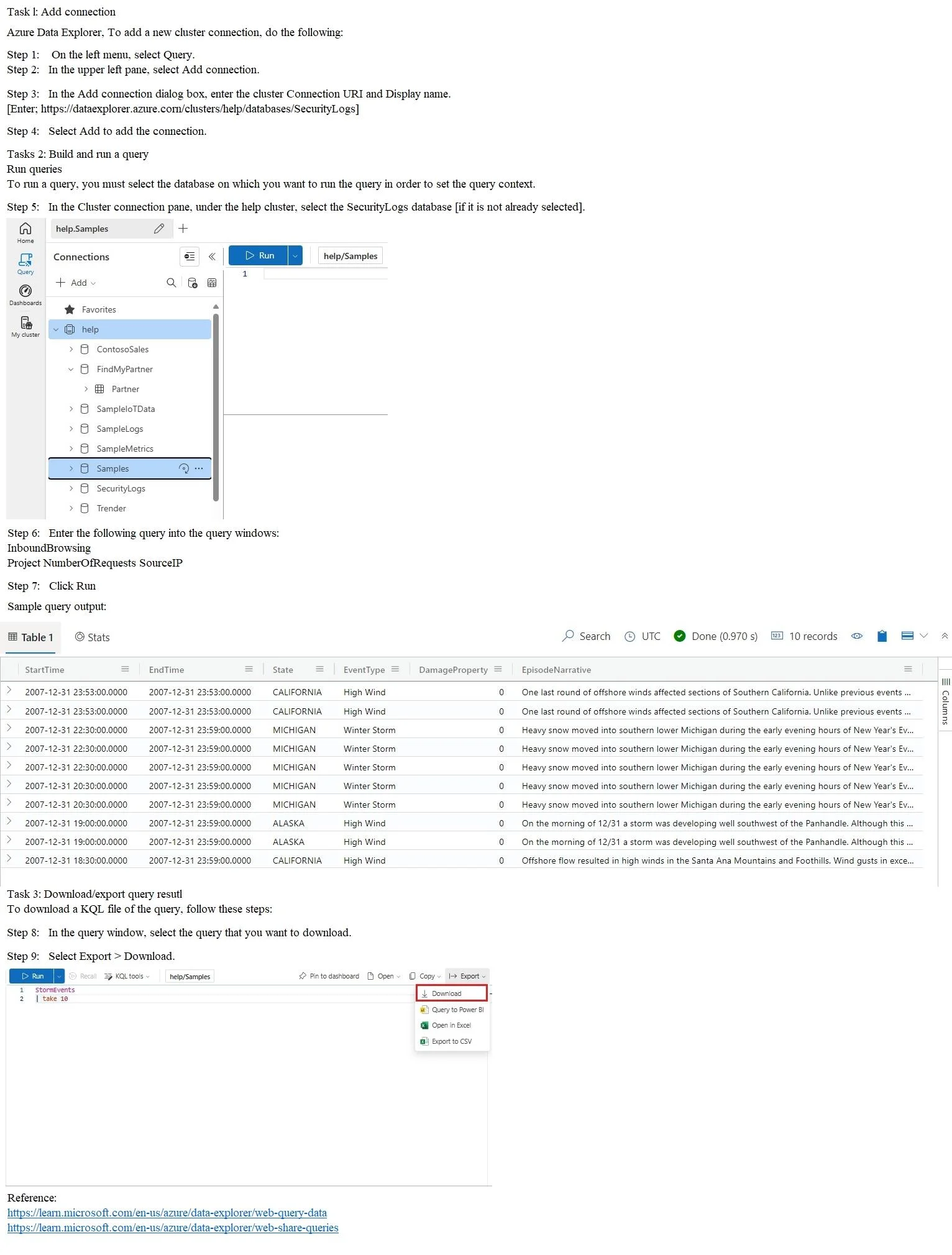
Explanation
KQL Simulation: Counting Inbound Requests by Source IP
Overall Goal
The task is to query a security log table in Azure Data Explorer (ADX), aggregate connection data by source IP address for Q4 2021 (October-December), and export the results. ADX uses Kusto Query Language (KQL), a read-only query language optimized for time-series and log analytics.
Step-by-Step Breakdown
Steps 1-3: Connect to the cluster
ADX is organized as: Cluster -> Database -> Table. You must first establish a connection to the cluster URI before you can see any databases or tables. Skipping this means you have nothing to query against. The cluster here is help (Microsoft's public demo cluster), and the database is SecurityLogs.
If you use the wrong URI or skip adding the connection, the database won't appear in the panel and you can't proceed.
Step 4: Select the SecurityLogs database
Selecting the correct database scopes all subsequent queries to that database's tables. ADX clusters can contain many databases - if you're on the wrong one, the InboundBrowsing table won't exist and the query will fail with a table-not-found error.
Step 5: Open a new query tab
This gives you a blank editor to write KQL. Simple, but required - you can't type into the cluster/database panel itself.
Step 6-7: The KQL query
InboundBrowsing
| where Timestamp between (datetime(2021-10-01) .. datetime(2021-12-31))
| summarize NumberOfRequests = count() by SourceIP
| project NumberOfRequests, SourceIP
Each pipe (|) passes the result of the previous step to the next operator:
| Operator | Purpose | Why it matters |
|---|---|---|
InboundBrowsing | Names the source table | Starting point - all rows in the table |
where Timestamp between (...) | Filters to Oct 1 - Dec 31, 2021 | "Last three months of 2021" = Q4. Without this, you'd count all-time data |
summarize count() by SourceIP | Groups rows by source IP and counts them | This is the aggregation that produces one row per IP with its request count |
project NumberOfRequests, SourceIP | Selects and renames output columns | The exam requires exactly these two column names in this order |
Critical detail:
between (datetime(2021-10-01) .. datetime(2021-12-31))is inclusive on both ends. Using<instead of..or wrong dates would silently return wrong data - no error, just wrong results.
Step 8: Run the query
Executes the KQL. Results appear in the results pane below. You must run before exporting - there's nothing to export otherwise.
Steps 9-11: Export to CSV at C:\Samples
The exam requires the result to be persisted locally. ADX doesn't auto-save results - you must explicitly export. The path C:\Samples is specified by the question, so using any other path would be incorrect for the simulation grader.
If you export before running, you'll export an empty result set. Order matters here.
What Goes Wrong If Steps Are Skipped
| Skipped step | Consequence |
|---|---|
| Wrong/missing cluster connection | Can't see SecurityLogs database |
Missing where filter | Returns all-time data, not Q4 2021 |
Missing summarize | Returns raw rows, not aggregated counts |
Missing project | Column names won't match required output |
| Running before connecting | Nothing to query |
| Exporting before running | Empty export |
Memory Tip
Think of the query as a pipeline that narrows, then shapes:
- Pick the table ->
InboundBrowsing - Filter by time ->
where Timestamp between - Aggregate ->
summarize count() by SourceIP - Shape output ->
projectthe two required columns
The mnemonic "Table -> Time -> Tally -> Tidy" maps directly to these four steps.
Topics
Community Discussion
No community discussion yet for this question.