
AZ-400 · Question #517
SIMULATION For the RG1lod12345678 resource group, you need to create an action group named DevOpsAG that can be triggered in any region by using Alerts. The action group must email two users named…
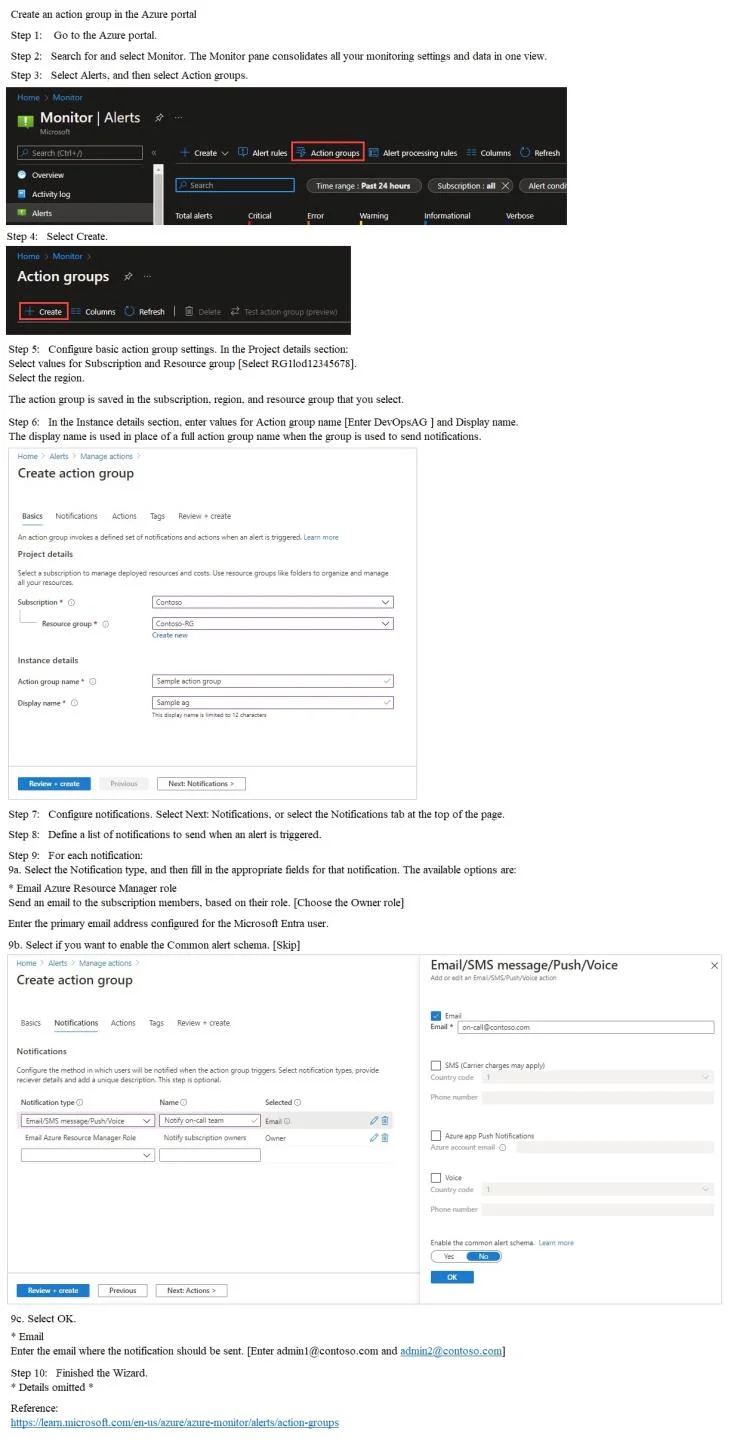
The correct approach requires navigating to Azure Monitor > Alerts > Action Groups and creating 'DevOpsAG' with the region set to 'Global' (so it can be triggered in any region). Two email notification actions must be added for [email protected] and [email protected], and an…
Question
Exhibit
Explanation
The correct approach requires navigating to Azure Monitor > Alerts > Action Groups and creating 'DevOpsAG' with the region set to 'Global' (so it can be triggered in any region). Two email notification actions must be added for [email protected] and [email protected], and an Azure Resource Manager Role notification must be added for the 'Owner' role with the 'Use common alert schema' toggle enabled. The common alert schema standardizes the JSON payload across all alert types, ensuring consistent notification format when notifying role members.
Topics
Community Discussion
No community discussion yet for this question.