
AZ-400 · Question #288
Hotspot Question You have an Azure web app named Webapp1. You need to use an Azure Monitor query to create a report that details the top 10 pages of Webapp1 that failed. How should you complete the…
The correct answer is : pageViews; where: success == false. This question tests knowledge of Azure Monitor / Application Insights KQL (Kusto Query Language) to query page-view failure data and return the top 10 failing pages for a web app.
Question
Exhibit
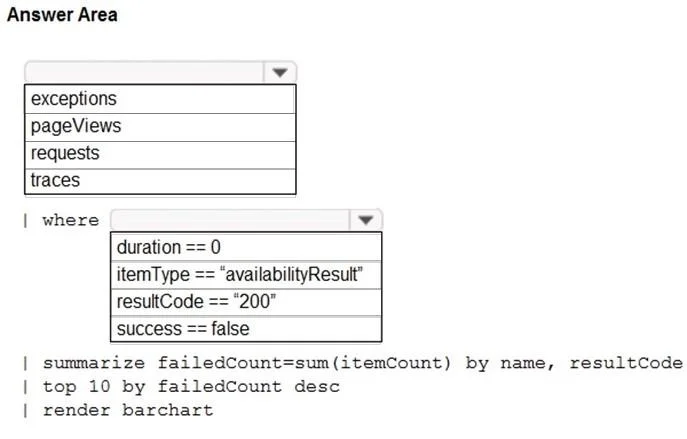
Answer Area
- pageViewsexceptionspageViewsrequeststraces
- wheresuccess == falseduration == 0itemType == "availabilityResult"resultCode == "200"success == false
Explanation
This question tests knowledge of Azure Monitor / Application Insights KQL (Kusto Query Language) to query page-view failure data and return the top 10 failing pages for a web app.
Approach. The correct query uses the 'pageViews' table from Application Insights, filters for failed requests using 'where success == false', summarizes by counting occurrences grouped by the page name using 'summarize count() by name', orders the results in descending order with 'order by count_ desc', and finally limits the output to the top 10 rows using 'take 10'. The complete query is: pageViews | where success == false | summarize count() by name | order by count_ desc | take 10. The 'pageViews' table contains client-side page view telemetry including success/failure status and page names, making it the correct data source for this scenario.
Concept tested. Azure Monitor / Application Insights KQL querying - specifically using the pageViews table, filtering on the success field, summarizing with count() grouped by name, ordering results descending, and using take to limit results to top 10 failed pages.
Reference. https://learn.microsoft.com/en-us/azure/azure-monitor/app/analytics-overview and https://learn.microsoft.com/en-us/azure/data-explorer/kusto/query/
Topics
Community Discussion
No community discussion yet for this question.