
AZ-400 · Question #287
Drag and Drop Question You have an Azure DevOps organization named Contoso. You have 10 Azure virtual machines that run Windows Server 2019. The virtual machines host an application that you build…
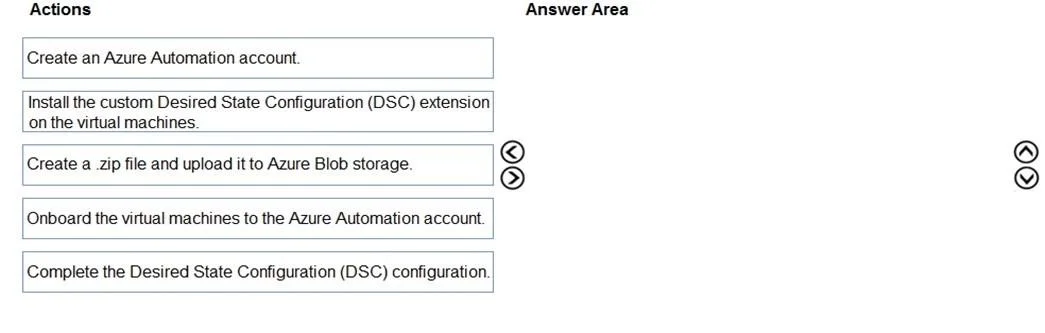
The correct answer is Create an Azure Automation account.; Complete the Desired State Configuration (DSC) configuration.; Onboard the virtual machines to the Azure Automation account.; Install the custom Desired State Configuration (DSC) extension on the virtual machines. The correct sequence uses Azure Automation State Configuration (DSC) to centrally manage IIS configurations: first create an Azure Automation account as the management hub, then author/complete the DSC configuration script defining the desired IIS state, next onboard (register)…
Question
Exhibits
Answer Area
Drag items
Correct arrangement
- Create an Azure Automation account.
- Complete the Desired State Configuration (DSC) configuration.
- Onboard the virtual machines to the Azure Automation account.
- Install the custom Desired State Configuration (DSC) extension on the virtual machines.
Explanation
The correct sequence uses Azure Automation State Configuration (DSC) to centrally manage IIS configurations: first create an Azure Automation account as the management hub, then author/complete the DSC configuration script defining the desired IIS state, next onboard (register) the virtual machines to the Automation account so they pull configurations, and finally install the DSC extension on the VMs to enable the Local Configuration Manager (LCM) to enforce the desired state. This approach provides centralized management through Azure Automation's DSC pull server model, minimizing overhead by automatically remediating configuration drift without manual intervention.
Topics
Community Discussion
No community discussion yet for this question.