
AZ-400 · Question #389
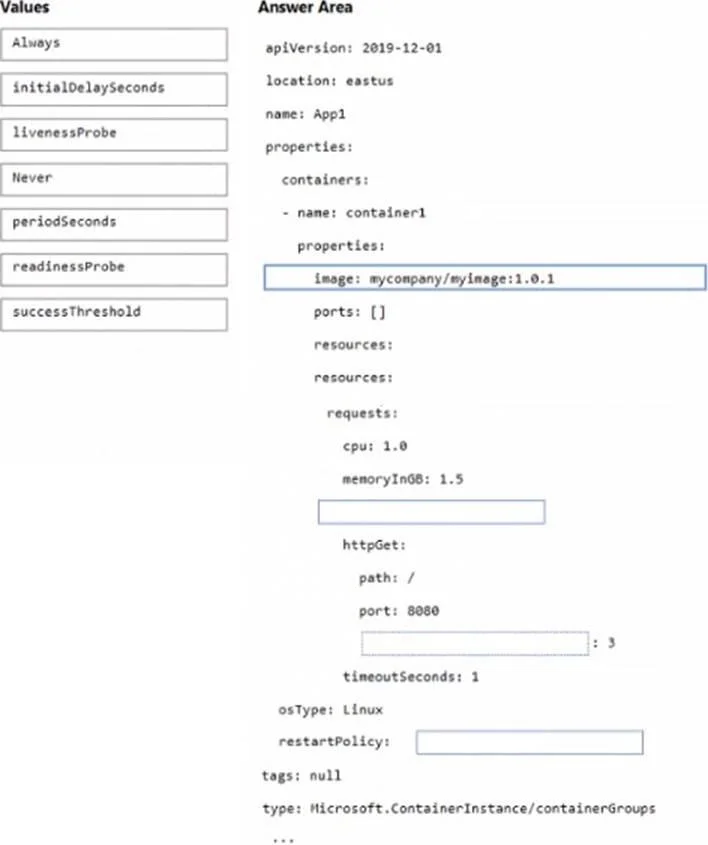
Drag and Drop Question You have an Azure Kubernetes Service (AKS) pod that hosts an app named App1. You need to configure the AKS container to restart automatically if the container stops…
The correct answer is livenessProbe; successThreshold; periodSeconds. Kubernetes Liveness Probe Configuration - Explanation Context The question presents a Kubernetes deployment YAML with blanks to fill. The goal: automatically restart a container that stops responding, checking every 3 seconds. --- Position 1: livenessProbe Why not…
Question
Exhibit
Answer Area
Drag items
Correct arrangement
- livenessProbe
- successThreshold
- periodSeconds
Explanation
Kubernetes Liveness Probe Configuration - Explanation
Context
The question presents a Kubernetes deployment YAML with blanks to fill. The goal: automatically restart a container that stops responding, checking every 3 seconds.
Position 1: livenessProbe
Why not readinessProbe?
| Probe | Failure Action |
|---|---|
livenessProbe | Kills and restarts the container |
readinessProbe | Removes pod from Service endpoints (no restart) |
The requirement says "restart automatically if the container stops responding" - that is precisely what livenessProbe does. A readinessProbe failure only stops traffic from reaching the pod; it never triggers a restart.
Position 2: successThreshold
This field defines how many consecutive successes are needed to consider the probe passing. For a livenessProbe, Kubernetes requires this value to be 1 - it cannot be higher. Setting it confirms the probe is valid and correctly scoped. It appears here to satisfy the YAML field slot that requires a threshold value.
Common mistake: Confusing successThreshold with failureThreshold. failureThreshold controls how many failures before the container is killed; successThreshold controls recovery confirmation.
Position 3: periodSeconds
The requirement explicitly states "once every three seconds" - periodSeconds: 3 is the direct mapping. This field controls the interval between probe executions.
Common mistake: Choosing initialDelaySeconds here. That field delays when probing starts (useful to give the app time to boot), but it does not control polling frequency. periodSeconds is the recurring interval.
Why initialDelaySeconds, Never, Always are not used
initialDelaySeconds- controls startup delay, not check frequencyAlways/Never- these arerestartPolicyvalues on the Pod spec, not probe fields- The liveness probe mechanism already implies restart behavior via Kubernetes' default
restartPolicy: Always
Topics
Community Discussion
No community discussion yet for this question.