
AZ-400 · Question #263
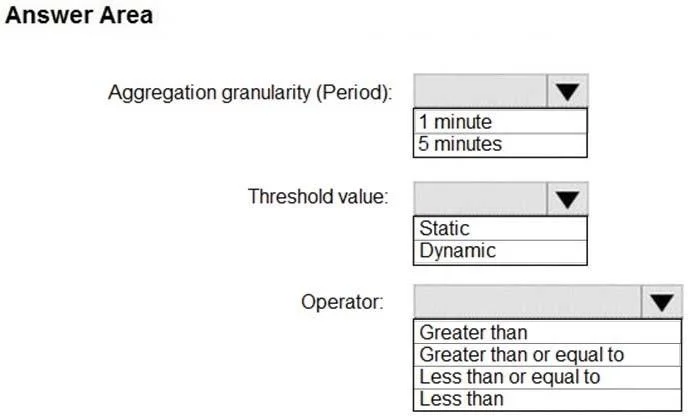
Hotspot Question You use Azure DevOps to manage the build and deployment of an app named App1. You have release pipeline that deploys a virtual machine named VM1. You plan to monitor the release…
The correct answer is Aggregation granularity (Period):: 1 minute; Threshold value:: Static; Operator:: Greater than. This hotspot question tests your ability to configure an Azure Monitor alert rule to track VM CPU performance with specific threshold, aggregation period, and evaluation frequency settings.
Question
Exhibit
Answer Area
- Aggregation granularity (Period):1 minute1 minute5 minutes
- Threshold value:StaticStaticDynamic
- Operator:Greater thanGreater thanGreater than or equal toLess than or equal toLess than
Explanation
This hotspot question tests your ability to configure an Azure Monitor alert rule to track VM CPU performance with specific threshold, aggregation period, and evaluation frequency settings.
Approach. The alert rule should be configured with a Threshold value of 70 (percent) to trigger when CPU exceeds 70%. The Aggregation granularity (Period) should be set to 5 minutes, meaning the alert evaluates the average CPU over a 5-minute window. The Frequency of evaluation should be set to 1 minute, meaning Azure Monitor checks the condition once every minute. This combination ensures the alert triggers only when the rolling 5-minute average CPU exceeds 70%, checked every 60 seconds.
Concept tested. Azure Monitor alert rule configuration - specifically understanding the difference between 'Aggregation granularity (Period)' which defines the time window over which the metric is averaged (5 minutes), 'Frequency of evaluation' which defines how often the condition is checked (1 minute), and the 'Threshold' value (70%) that triggers the alert. Confusing the period with the frequency is a common mistake.
Reference. https://docs.microsoft.com/en-us/azure/azure-monitor/alerts/alerts-metric-overview
Topics
Community Discussion
No community discussion yet for this question.