
AZ-400 · Question #264
Hotspot Question You have an Azure Kubernetes Service (AKS) pod. You need to configure a probe to perform the following actions: - Confirm that the pod is responding to service requests. - Check the…
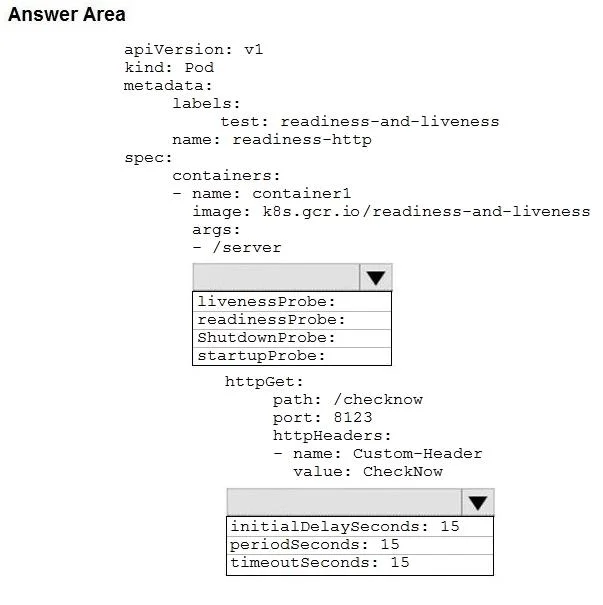
The correct answer is Select the probe type: livenessProbe:; Select the probe timing parameter: periodSeconds: 15. This question tests knowledge of Kubernetes liveness probes in AKS YAML configuration, specifically how to configure a probe that detects unresponsive pods and triggers a restart/shutdown cycle.
Question
Exhibits
Answer Area
- Select the probe typelivenessProbe:livenessProbe:readinessProbe:ShutdownProbe:startupProbe:
- Select the probe timing parameterperiodSeconds: 15initialDelaySeconds: 15periodSeconds: 15timeoutSeconds: 15
Explanation
This question tests knowledge of Kubernetes liveness probes in AKS YAML configuration, specifically how to configure a probe that detects unresponsive pods and triggers a restart/shutdown cycle.
Approach. The correct probe type is 'livenessProbe' because it confirms the pod is responding to service requests and initiates a shutdown (restart) if the pod becomes unresponsive - this matches the liveness probe's exact purpose. To check the status four times a minute (every 15 seconds), you set 'periodSeconds: 15'. The YAML structure should include 'livenessProbe:' as the probe kind, with 'periodSeconds: 15' to achieve four checks per minute (60 seconds / 4 = 15 seconds). A readinessProbe would be incorrect here because it only gates traffic routing and does NOT trigger pod restarts/shutdowns when failing.
Concept tested. Kubernetes probe types in AKS: understanding the difference between livenessProbe (restarts unresponsive pods), readinessProbe (controls traffic routing), and startupProbe (handles slow-starting containers), along with correct periodSeconds calculation for desired check frequency.
Topics
Community Discussion
No community discussion yet for this question.