
AZ-400 · Question #175
SIMULATION Your company plans to implement a new compliance strategy that will require all Azure web apps to be backed up every five hours. You need to back up an Azure web app named…
This simulation tests your ability to configure automated scheduled backups for an Azure App Service (web app) using Azure Storage, meeting a compliance requirement of backing up every five hours.
Question
Exhibit
Explanation
This simulation tests your ability to configure automated scheduled backups for an Azure App Service (web app) using Azure Storage, meeting a compliance requirement of backing up every five hours.
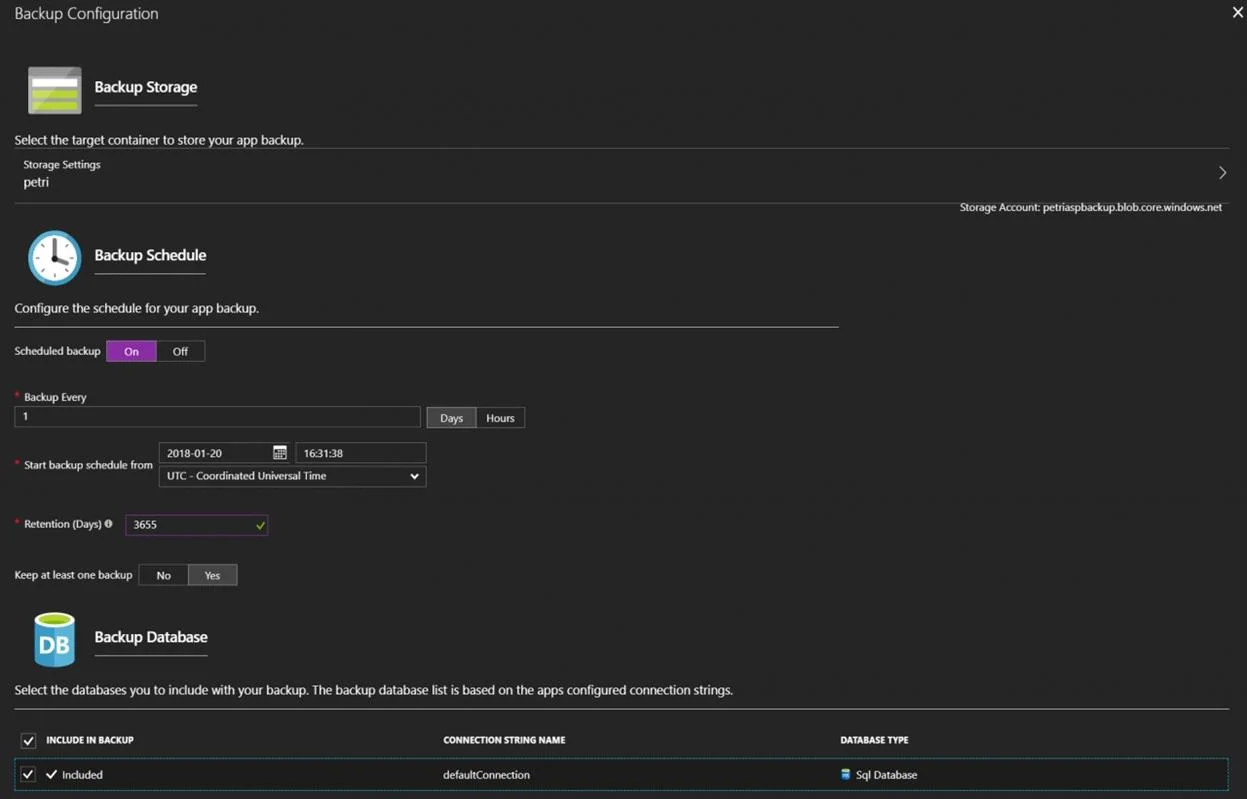
Approach. The correct approach is to navigate to the App Service 'az400-11566895-main' in the Azure Portal, go to Settings > Backups, and click 'Configure' to open the Backup Configuration blade. From there, you select the target Azure Storage account, create or select a blob container to store the backups, toggle 'Scheduled Backup' to On, and set the frequency to every 5 hours. Finally, you configure retention settings and click Save to activate the backup policy.
Concept tested. Azure App Service Backup and Restore - specifically how to configure scheduled automated backups for a web app to an Azure Storage account via the Azure Portal, including setting backup frequency, selecting a storage container, and managing retention policies to meet compliance requirements.
Reference. https://learn.microsoft.com/en-us/azure/app-service/manage-backup
Community Discussion
No community discussion yet for this question.