nerdexam
Microsoft

AZ-120 · Question #90

Drag and Drop Question You have two Azure virtual machines. The virtual machines host a highly available SAP HANA cluster that has HANA system replication configured. You plan to configure Azure…

The correct answer is On both nodes, create a custom HANA user.; On both nodes, add a key to hdbuserstore.; On both nodes, run the Azure Backup preregistration script.; From Azure Backup, select Start Discovery. Azure Backup for SAP HANA System Replication - Step-by-Step Explanation Context When HANA system replication is configured, either node can become primary after a failover. Azure Backup must be able to authenticate to whichever node is currently primary. The sequence below…

Maintain SAP workloads on Azure

Question

Drag and Drop Question You have two Azure virtual machines. The virtual machines host a highly available SAP HANA cluster that has HANA system replication configured. You plan to configure Azure Backup to protect the replicated databases of the cluster. You need to ensure that when a failover occurs, Azure Backup automatically uses the new primary node for backups. Which four actions should you perform in sequence? To answer, move the appropriate actions from the list of actions to the answer area and arrange them in the correct order. Answer:

Exhibit
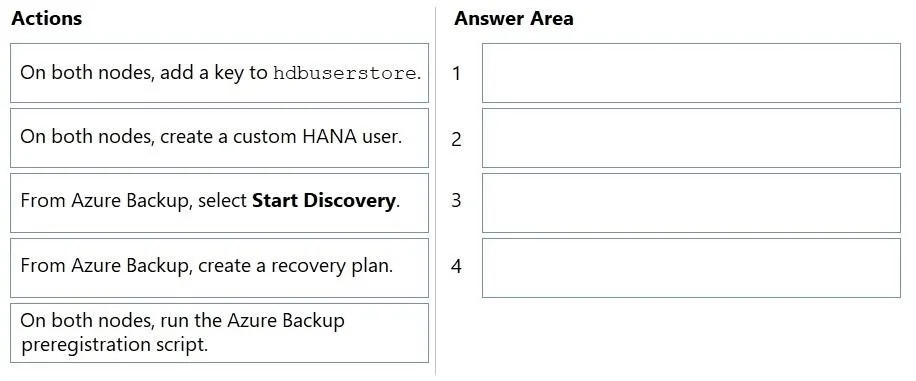
AZ-120 question #90 exhibit

Answer Area

Drag items

On both nodes, add a key to hdbuserstore.On both nodes, create a custom HANA user.From Azure Backup, select Start Discovery.From Azure Backup, create a recovery plan.On both nodes, run the Azure Backup preregistration script.

Correct arrangement

  • On both nodes, create a custom HANA user.
  • On both nodes, add a key to hdbuserstore.
  • On both nodes, run the Azure Backup preregistration script.
  • From Azure Backup, select Start Discovery.

Explanation

Azure Backup for SAP HANA System Replication - Step-by-Step Explanation

Context

When HANA system replication is configured, either node can become primary after a failover. Azure Backup must be able to authenticate to whichever node is currently primary. The sequence below builds the authentication chain from the inside out, then registers with Azure.


Step 1 - On both nodes, create a custom HANA user

Why first: Everything else depends on having a dedicated HANA database user that Azure Backup will use to connect. This user must be granted specific roles (e.g., BACKUP ADMIN, CATALOG READ, DATABASE ADMIN). Without this user, there is nothing to store in the keystore and nothing for the preregistration script to authenticate as.

Why both nodes: After failover, the new primary must already have this user; you cannot create it reactively.


Step 2 - On both nodes, add a key to hdbuserstore

Why second: hdbuserstore is HANA's secure credential store - it maps a logical key name to a host/port/username/password tuple. The preregistration script (next step) uses this key to connect to HANA without exposing credentials in plain text. The user must exist before you can store credentials for it.

Why both nodes: At failover time, the secondary (now primary) node's local hdbuserstore must already have the key so backup operations can authenticate immediately without manual intervention.


Step 3 - On both nodes, run the Azure Backup preregistration script

Why third: Microsoft provides a shell script that installs required plugins, validates HANA connectivity (using the hdbuserstore key you just created), and registers the VM as backup-capable. It cannot succeed without the user and key already in place. Running it on both nodes ensures the failover node is equally prepared.

Why before discovery: Azure Backup's discovery mechanism only finds databases on VMs that have been preregistered. Running discovery first would find nothing.


Step 4 - From Azure Backup, select Start Discovery

Why last: Now that both nodes are fully prepared, you trigger discovery from the Azure portal. Azure Backup scans the preregistered VMs, finds the HANA databases, and surfaces them for protection policy assignment. This is a pull action from Azure - it cannot precede the push actions on the nodes.


Why "Create a recovery plan" is excluded

A recovery plan belongs to Azure Site Recovery (ASR), which handles VM-level replication and failover orchestration. It has no role in configuring Azure Backup for database-level backup and restore. This is a deliberate distractor that tests whether you confuse disaster recovery (ASR) with backup (Azure Backup).


Common Mistakes

MistakeWhy it's wrong
Running the preregistration script before hdbuserstoreScript tries to connect to HANA during validation - no credentials = failure
Running discovery before preregistrationDiscovery returns empty results; VMs are not registered yet
Configuring only one nodeAfter failover, the unprepared node cannot serve as a backup source
Including "create a recovery plan"This is an ASR concept, not an Azure Backup concept

Topics

#Azure Backup#SAP HANA#HANA system replication#hdbuserstore

Community Discussion

No community discussion yet for this question.

Full AZ-120 Practice