
AZ-120 · Question #268
Drag and Drop Question You have an SAP NetWeaver deployment hosted on Azure virtual machines. You need to implement Azure Monitor for SAP Solutions. The solution must ensure that the source data is…
The correct answer is Unprotect methods for metrics.; Restart the SAPStartSRV service. Azure Monitor for SAP Solutions - NetWeaver Metrics Configuration Context Azure Monitor for SAP Solutions (AMS) collects NetWeaver metrics via the SAPControl web service, which is exposed by the SAPStartSRV (SAP Start Service) process running on each NetWeaver host. By default…
Question
Drag and Drop Question You have an SAP NetWeaver deployment hosted on Azure virtual machines. You need to implement Azure Monitor for SAP Solutions. The solution must ensure that the source data is available for all NetWeaver metric workbook visualizations. What should you include in the solution? To answer, drag the appropriate configurations to the correct portals. Each configuration may be used once, more than once, or not at all. You may need to drag the split bar between panes or scroll to view content. NOTE: Each correct selection is worth one point. Answer:
Exhibit
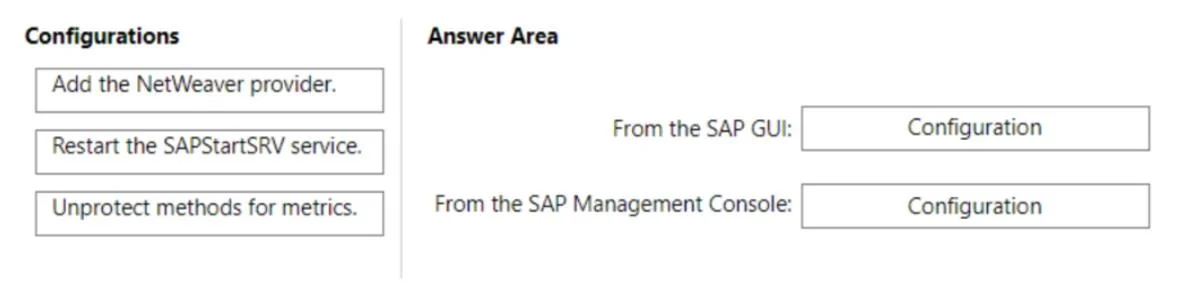
Answer Area
Drag items
Correct arrangement
- Unprotect methods for metrics.
- Restart the SAPStartSRV service.
Explanation
Azure Monitor for SAP Solutions - NetWeaver Metrics Configuration
Context
Azure Monitor for SAP Solutions (AMS) collects NetWeaver metrics via the SAPControl web service, which is exposed by the SAPStartSRV (SAP Start Service) process running on each NetWeaver host. By default, certain SAPControl web methods are protected, meaning external callers (like the AMS data collector) cannot invoke them. If those methods remain protected, the AMS NetWeaver workbook will have gaps or empty visualizations.
Item-by-Item Breakdown
Position 1 - Unprotect methods for metrics
This is the root cause fix. SAPControl exposes methods such as GetQueueStatistic, ABAPGetSystemWPTable, GetProcessList, etc. When these methods are protected, AMS cannot retrieve the underlying data. You unprotect them by editing the SAP instance profile (adding entries like service/protectedwebmethods = with the target methods removed from the protected list). This is the prerequisite - without it, restarting anything changes nothing.
Position 2 - Restart the SAPStartSRV service
Profile parameter changes do not take effect at runtime until SAPStartSRV is restarted. SAPStartSRV reads its configuration at startup, so a restart is required to pick up the unprotected method list. Only after this restart will AMS be able to successfully call the previously protected methods and populate all workbook visualizations.
Why "Add the NetWeaver provider" is excluded
Adding the NetWeaver provider in the Azure portal is a one-time setup step for AMS itself, not a configuration that ensures source data availability. The question's constraint is specifically about making all metric data accessible from the SAP side. Adding the provider without unprotecting methods will result in incomplete data - the provider exists but can't retrieve protected metrics.
Common Mistakes
| Mistake | Why it's wrong |
|---|---|
| Restarting SAPStartSRV before unprotecting methods | The restart has no effect if the profile wasn't changed first - order matters |
| Thinking "Add the NetWeaver provider" is sufficient | Provider registration in Azure doesn't fix SAP-side method protection |
| Skipping the restart | Profile changes are ignored at runtime without a SAPStartSRV restart |
Key rule: SAP-side access must be opened (unprotect) → then applied (restart) → then the AMS provider can collect complete data.
Topics
Community Discussion
No community discussion yet for this question.