
AZ-104 · Question #703
Hotspot Question You have an Azure Storage account named storage1 that contains a container named container1. The container1 container stores thousands of image files. You plan to use an Azure…
The correct answer is "blobTypes":: blockBlob; "prefixMatch":: container1/finance. This question tests your knowledge of configuring Azure Blob Inventory rules using ARM templates, specifically how to filter blobs by prefix and set the output format and schedule.
Question
Exhibit
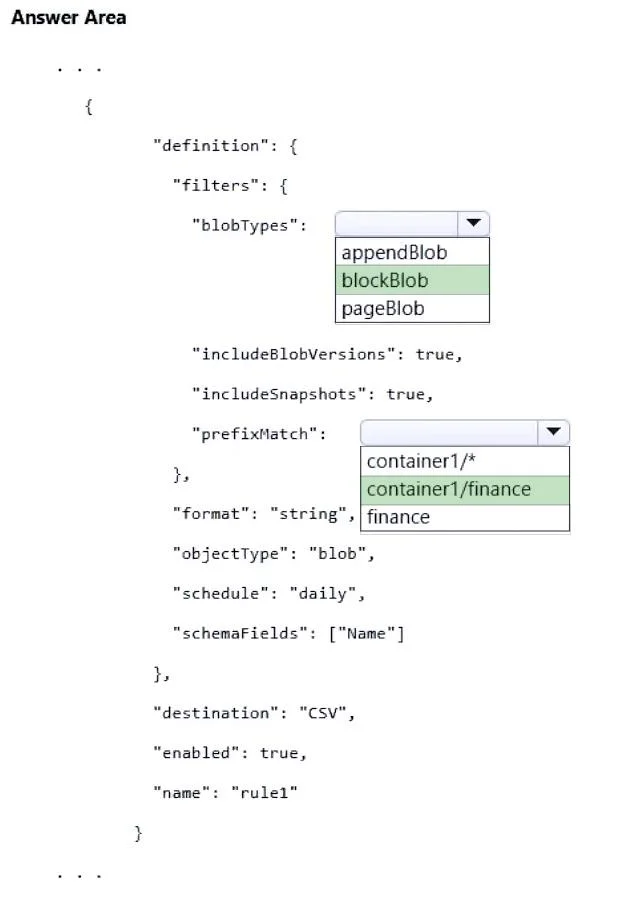
Answer Area
- "blobTypes":blockBlobappendBlobblockBlobpageBlob
- "prefixMatch":container1/financecontainer1/*container1/financefinance
Explanation
This question tests your knowledge of configuring Azure Blob Inventory rules using ARM templates, specifically how to filter blobs by prefix and set the output format and schedule.
Approach. For rule1, the correct configuration requires setting 'enabled' to true, 'format' to 'Csv', 'schedule' to 'Daily', 'objectType' to 'Blob', and adding a 'prefixMatch' filter with the value 'finance'. The prefixMatch array filters the inventory to only include blobs whose names begin with 'finance'. Setting format to 'Csv' ensures output is a CSV file, and schedule to 'Daily' ensures the inventory runs every day. The destination should be set to 'container1' so the CSV inventory file is stored in that same container.
Concept tested. Azure Blob Inventory rules in ARM templates - specifically the properties: format (Csv/Parquet), schedule (Daily/Weekly), objectType (Blob/Container), prefixMatch for filtering blob names by prefix, and the destination container setting.
Reference. https://learn.microsoft.com/en-us/azure/storage/blobs/blob-inventory#inventory-policy
Topics
Community Discussion
No community discussion yet for this question.