
AZ-104 · Question #702
Hotspot Question You have an Azure subscription. You plan to create the Azure Storage account as shown in the following exhibit. Use the drop-down menus to select the answer choice that completes…
The correct answer is The minimum number of copies of the storage account will be: 2; To reduce the cost of infrequently accessed data in the storage account, you must modify the: Access tier (default). This is a hotspot question with two drop-down selections based on the provided Azure Storage account creation exhibit. 1. The minimum number of copies of the storage account will be => 2 The exhibit shows that the storage account's Replication setting is Locally-redundant…
Question
Exhibits
Answer Area
- The minimum number of copies of the storage account will be21234
- To reduce the cost of infrequently accessed data in the storage account, you must modify theAccess tier (default)Access tier (default)PerformanceAccount kindReplication
Explanation
This is a hotspot question with two drop-down selections based on the provided Azure Storage account creation exhibit.
1. The minimum number of copies of the storage account will be => 2
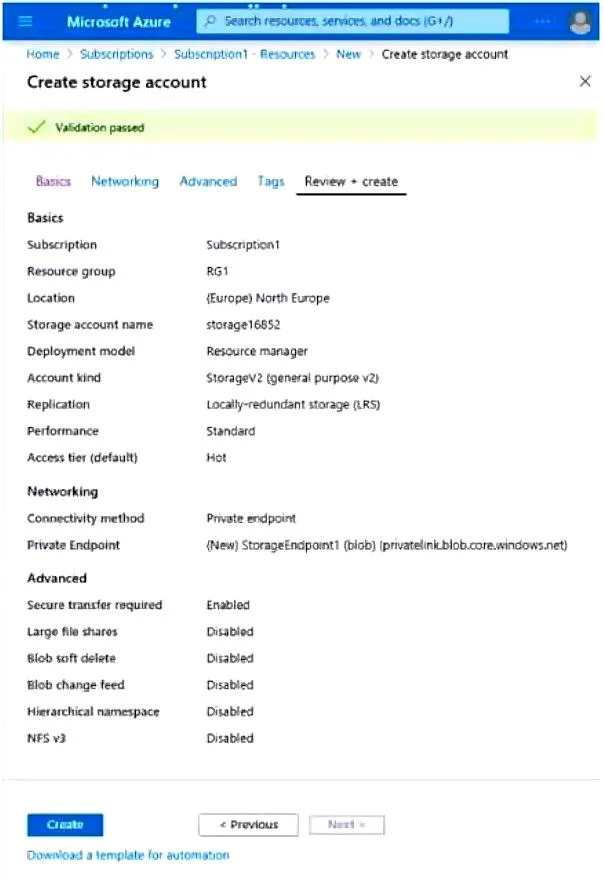
The exhibit shows that the storage account's Replication setting is Locally-redundant storage (LRS). LRS maintains three copies of your data within a single datacenter in the primary region. While LRS provides three copies, the question asks for the minimum number of copies. In the context of ensuring redundancy and preventing a single point of failure, having at least two copies is the minimum requirement to maintain data availability if one copy becomes unavailable. Therefore, 2 is selected as the minimum number of copies for redundancy.
2. To reduce the cost of infrequently accessed data in the storage account, you must modify the => Access tier (default)
The exhibit indicates the Access tier (default) is Hot. Azure Storage accounts (specifically StorageV2, as shown by Account kind: StorageV2 (general purpose v2)) offer different access tiers: Hot, Cool, and Archive. These tiers are designed to optimize costs based on how frequently data is accessed.
- Hot tier: Optimized for frequently accessed data, with higher storage costs and lower access costs.
- Cool tier: Optimized for infrequently accessed data, with lower storage costs and higher access costs.
- Archive tier: Optimized for rarely accessed data, with the lowest storage costs but highest access costs and retrieval latency.
To reduce the cost of infrequently accessed data, the most appropriate action is to modify the Access tier (default) from Hot to Cool or Archive, which directly aligns with cost optimization for different data access patterns.
Topics
Community Discussion
No community discussion yet for this question.