
AZ-104 · Question #256
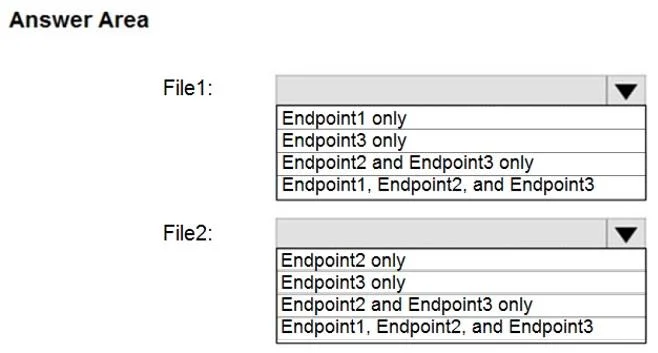
Hotspot Question You have an Azure File sync group that has the endpoints shown in the following table. Cloud tiering is enabled for Endpoint3. You add a file named File1 to Endpoint1 and a file…
This question tests understanding of Azure File Sync replication behavior, specifically how files sync across server endpoints and cloud endpoints, and how cloud tiering affects file availability.
Question
Exhibit
Answer Area
- File1:Endpoint1 onlyEndpoint3 onlyEndpoint2 and Endpoint3 onlyEndpoint1, Endpoint2, and Endpoint3
- File2:Endpoint2 onlyEndpoint3 onlyEndpoint2 and Endpoint3 onlyEndpoint1, Endpoint2, and Endpoint3
Explanation
This question tests understanding of Azure File Sync replication behavior, specifically how files sync across server endpoints and cloud endpoints, and how cloud tiering affects file availability.
Approach. In Azure File Sync, all endpoints within the same sync group stay synchronized - files added to any endpoint replicate to all other endpoints in the group, including the Azure file share (cloud endpoint) and all server endpoints. File1 added to Endpoint1 (a server endpoint) will sync to the Azure file share and all other server endpoints, making it available on Endpoint1, Endpoint2, Endpoint3, and the cloud endpoint. File2 added to Endpoint2 similarly syncs to all endpoints. However, Endpoint3 has cloud tiering enabled, meaning files on Endpoint3 may exist only as stubs (pointers) on the local disk rather than fully downloaded files - the data is stored in the Azure file share and recalled on demand. So both File1 and File2 will be 'available' on Endpoint3 (as tiered/stub files), and fully present on Endpoint1 and Endpoint2. Within 24 hours, both files will be available on ALL endpoints (Endpoint1, Endpoint2, Endpoint3, and the cloud endpoint), with the caveat that on Endpoint3 they may be cloud-tiered stubs rather than fully local copies.
Concept tested. Azure File Sync replication topology: all endpoints in a sync group synchronize with the cloud endpoint (Azure file share), and through it with all other server endpoints. Cloud tiering affects local disk storage (files may be stubbed), but the files are still logically accessible from all endpoints. Files added to any server endpoint propagate to the cloud endpoint first, then to all other server endpoints within the sync interval.
Topics
Community Discussion
No community discussion yet for this question.