
AZ-104 · Question #346
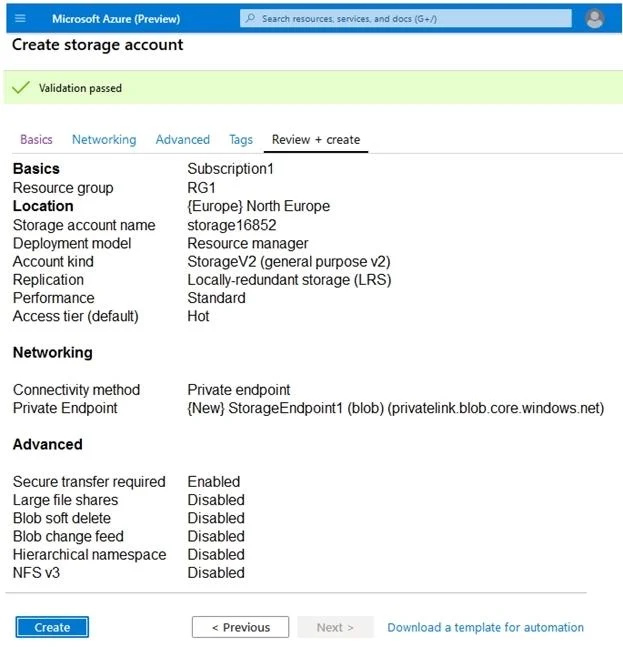
Hotspot Question You have an Azure subscription. You create the Azure Storage account shown in the following exhibit. Use the drop-down menus to select the answer choice that completes each…
Azure Storage Account - Hotspot Question Explained --- Statement 1: Minimum number of copies = 3 Why 3? Azure Storage always replicates data for durability. The replication type shown in the exhibit is LRS (Locally Redundant Storage) - the lowest redundancy tier available. LRS…
Question
Exhibits
Answer Area
- The minimum number of copies of the storage account will be
- To reduce the cost of infrequently accessed data in the storage account, you must modify the setting
Explanation
Azure Storage Account - Hotspot Question Explained
Statement 1: Minimum number of copies = 3
Why 3?
Azure Storage always replicates data for durability. The replication type shown in the exhibit is LRS (Locally Redundant Storage) - the lowest redundancy tier available.
LRS maintains 3 synchronous copies of your data within a single datacenter (a single availability zone in one region). Even at the cheapest redundancy setting, Azure guarantees 3 copies minimum.
| Replication | Copies | Locations |
|---|---|---|
| LRS | 3 | 1 datacenter |
| ZRS | 3 | 3 availability zones |
| GRS | 6 | 2 regions (3+3) |
| GZRS | 6 | 2 regions, zone-redundant primary |
Memory tip: Think "Least = LRS = 3 local copies." You can never have fewer than 3 - that's the Azure floor.
Statement 2: To reduce cost of infrequently accessed data, modify "Access tier (default)"
Why Access tier (default)?
Azure Blob Storage supports tiered storage to optimize cost based on access frequency:
- Hot - frequent access, higher storage cost, lower access cost
- Cool - infrequent access, lower storage cost, higher access cost
- Cold - rarely accessed (min 90-day retention)
- Archive - almost never accessed (min 180-day retention), cheapest storage
The "Access tier (default)" setting at the storage account level sets the default tier applied to blobs on upload. Changing it from Hot -> Cool (or colder) reduces per-GB storage costs for blobs that aren't accessed frequently.
What you would NOT change:
- Replication - affects durability, not access cost
- Performance (Standard vs. Premium) - affects I/O speed, not tiering
- Account kind - e.g., StorageV2 is required to enable tiering, but changing it alone doesn't reduce cost
Memory tip: "Access tier = how hot your wallet burns." Cool/Archive data = cool/archived spending. The setting is literally named for access frequency.
Quick Summary
| Statement | Answer | Key Concept |
|---|---|---|
| Minimum copies | 3 | LRS = 3 synchronous local copies |
| Setting to change for infrequent data cost | Access tier (default) | Blob storage tiering (Hot/Cool/Cold/Archive) |
Topics
Community Discussion
No community discussion yet for this question.