
AZ-104 · Question #345
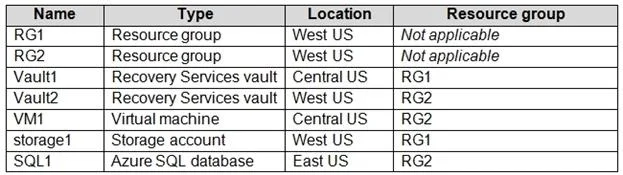
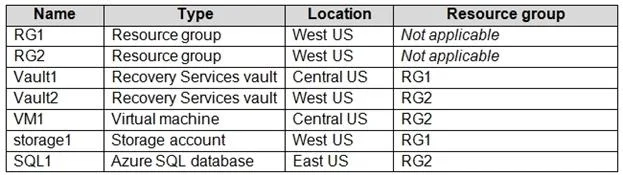
Hotspot Question You have an Azure subscription named Subscription1 that contains the resources shown in the following table. In storage1, you create a blob container named blob1 and a file share…
The correct answer is VM1 can be backed up to Vault1 = Yes; VM1 can be backed up to Vault2 = No; blob1 can be backed up to Vault1 = No; blob1 can be backed up to Vault2 = No; share1 can be backed up to Vault1 = No; share1 can be backed up to Vault2 = Yes; SQL1 can be backed up to Vault1 = No; SQL1 can be backed up to Vault2 = No. Recovery Services vaults must reside in the same region as the resources they back up and only support specific workloads like Azure VMs and Azure File shares, not Azure Blobs or Azure SQL Databases.
Question
Exhibits
Answer Area
- VM1 can be backed up to Vault1Yes
- VM1 can be backed up to Vault2No
- blob1 can be backed up to Vault1No
- blob1 can be backed up to Vault2No
- share1 can be backed up to Vault1No
- share1 can be backed up to Vault2Yes
- SQL1 can be backed up to Vault1No
- SQL1 can be backed up to Vault2No
Explanation
Recovery Services vaults must reside in the same region as the resources they back up and only support specific workloads like Azure VMs and Azure File shares, not Azure Blobs or Azure SQL Databases.
Approach. First, evaluate the regional requirements. A Recovery Services vault can only back up resources that are in the exact same Azure region (location). Vault1 is located in 'Central US'. The only available resource in 'Central US' is VM1. Therefore, Vault1 can only back up VM1 (the fact that they are in different resource groups does not matter). Vault2 is located in 'West US'. The storage account (storage1) is also in 'West US'. The scenario states storage1 contains 'blob1' and 'share1'. Recovery Services vaults support backing up Azure File shares (share1), but they do not support backing up Azure Blobs (blob backup requires a different resource called a Backup vault). Therefore, Vault2 can only back up share1.
Common mistakes.
- common_mistake. A common mistake is ignoring the strict same-region requirement and assuming a vault can back up resources across different locations (like selecting SQL1 for Vault1). Another frequent error is misunderstanding supported workloads by assuming Recovery Services vaults can back up Azure Blobs or Azure SQL Databases. Blobs require Backup vaults, and Azure SQL Databases utilize built-in automated backups, not user-managed Recovery Services vaults.
Concept tested. Azure Recovery Services vault architecture, regional constraints for Azure Backup, and supported backup workloads vs. Backup vaults.
Reference. https://learn.microsoft.com/en-us/azure/backup/backup-support-matrix
Topics
Community Discussion
No community discussion yet for this question.