
AZ-104 · Question #344
Hotspot Question You have a hybrid deployment of Azure Active Directory (Azure AD) that contains the users shown in the following table. You need to modify the JobTitle and UsageLocation attributes…
In a hybrid Azure AD environment, JobTitle can only be modified for cloud-only users (User1, User3), while UsageLocation can generally be modified for all users, including those synchronized from on-premises (User1, User2, User3), due to its licensing implications.
Question
Exhibit
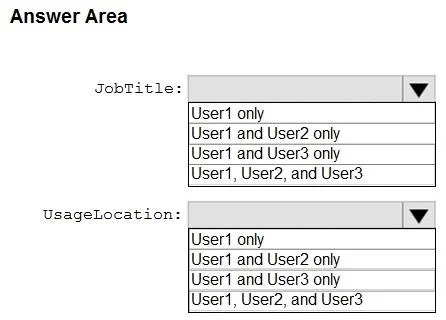
Answer Area
- JobTitle:User1 onlyUser1 and User2 onlyUser1 and User3 onlyUser1, User2, and User3
- UsageLocation:User1 onlyUser1 and User2 onlyUser1 and User3 onlyUser1, User2, and User3
Explanation
In a hybrid Azure AD environment, JobTitle can only be modified for cloud-only users (User1, User3), while UsageLocation can generally be modified for all users, including those synchronized from on-premises (User1, User2, User3), due to its licensing implications.
Approach. Based on the standard behavior of Azure AD Connect and attribute synchronization in a hybrid environment, the correct interaction is to select 'User1 and User3 only' for the 'JobTitle' attribute and 'User1, User2, and User3' for the 'UsageLocation' attribute. This implies the following about the users:
-
JobTitle: The JobTitle attribute is typically synchronized from on-premises Active Directory for users created on-premises. Therefore, for synchronized users, the JobTitle must be modified in the on-premises AD and then synced to Azure AD. It cannot be directly modified in Azure AD. This means User2 must be a synchronized user, while User1 and User3 are likely cloud-only users (created directly in Azure AD) or their JobTitle is not managed by on-premises sync, allowing direct modification in Azure AD.
-
UsageLocation: The UsageLocation attribute is crucial for assigning licenses and determining service availability based on geo-location. Unlike many other attributes, UsageLocation can often be modified directly in Azure AD, even for users synchronized from on-premises Active Directory. This flexibility is provided because Azure AD often needs to manage this attribute for licensing purposes, irrespective of its on-premises value or sync status. Therefore, all users (User1, User2, and User3), whether cloud-only or synchronized, can have their UsageLocation modified from Azure AD.
Inferring the user types from the correct solution: User1 and User3 are likely cloud-only users, and User2 is a synchronized user from on-premises AD.
Common mistakes.
- common_mistake. A common mistake is to assume that all attributes for synchronized users (e.g., User2) must be modified exclusively from on-premises Active Directory. This would lead to incorrectly excluding User2 from the 'UsageLocation' modification in Azure AD. While this assumption is true for many attributes like
JobTitle,UsageLocationis an exception due to its importance in Azure AD for licensing and service provisioning. Another mistake would be to assume thatJobTitlecan be modified for synchronized users, which is generally not the case as it's typically mastered on-premises.
Concept tested. Hybrid identity management, Azure AD Connect attribute synchronization rules, source of authority for user attributes in a hybrid environment, and specific attribute mutability in Azure AD for synchronized versus cloud-only users (specifically JobTitle vs. UsageLocation).
Topics
Community Discussion
No community discussion yet for this question.