
AZ-104 · Question #580
Hotspot Question You have an Azure subscription that contains the hierarchy shown in the following exhibit. You create an Azure Policy definition named Policy1. To which Azure resources can you…
Azure Policy can be assigned at the Management Group, Subscription, or Resource Group levels, while exclusions can target any child scope, including individual resources.
Question
Exhibit
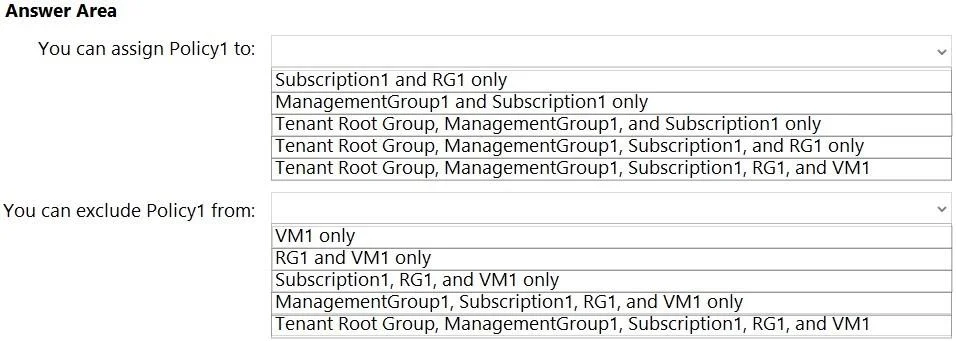
Answer Area
- You can assign Policy1 to:Subscription1 and RG1 onlyManagementGroup1 and Subscription1 onlyTenant Root Group, ManagementGroup1, and Subscription1 onlyTenant Root Group, ManagementGroup1, Subscription1, and RG1 onlyTenant Root Group, ManagementGroup1, Subscription1, RG1, and VM1
- You can exclude Policy1 from:VM1 onlyRG1 and VM1 onlySubscription1, RG1, and VM1 onlyManagementGroup1, Subscription1, RG1, and VM1 onlyTenant Root Group, ManagementGroup1, Subscription1, RG1, and VM1
Explanation
Azure Policy can be assigned at the Management Group, Subscription, or Resource Group levels, while exclusions can target any child scope, including individual resources.
Approach. In the Azure portal, Azure Policy definitions can be assigned to management groups (which includes the Tenant Root Group), subscriptions, and resource groups. They are not typically assigned directly to individual resources. Therefore, the valid assignment targets are the Tenant Root Group, ManagementGroup1, Subscription1, and RG1.
Exclusions (or 'NotScopes') are used to exempt specific sub-scopes or individual resources from a policy assignment inherited from a higher level. Because exclusions act on child scopes, you can exclude child management groups, subscriptions, resource groups, and individual resources (like VM1). The Tenant Root Group cannot be excluded because it is the absolute top of the hierarchy and cannot have a policy assigned above it.
Common mistakes.
- common_mistake. A common mistake is thinking policies can be assigned directly to individual resources like VMs in the standard portal UI, which leads to incorrectly selecting VM1 as an assignment target. Another mistake is assuming any scope can be excluded, failing to recognize that the Tenant Root Group, being the highest level, cannot be a child exclusion.
Concept tested. Azure Policy Assignment Scopes and Exclusions
Reference. https://learn.microsoft.com/en-us/azure/governance/policy/concepts/scope
Topics
Community Discussion
No community discussion yet for this question.