
AZ-104 · Question #764
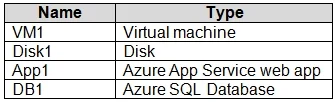
Hotspot Question You have an Azure subscription that contains an Azure Backup vault named Backup1, a Recovery Services vault named Recovery1, and the resources shown in the following table. You plan…
The correct answer is VM1: Recovery1; Disk1: Backup1; App1: Neither; DB1: Recovery1. Azure Managed Disks (Disk1) are backed up using a Backup vault, whereas Azure Virtual Machines (VM1) are backed up using a Recovery Services vault.
Question
Exhibits
Answer Area
- VM1Recovery1Backup1Recovery1Neither
- Disk1Backup1Backup1Recovery1Neither
- App1NeitherBackup1Recovery1Neither
- DB1Recovery1Backup1Recovery1Neither
Explanation
Azure Managed Disks (Disk1) are backed up using a Backup vault, whereas Azure Virtual Machines (VM1) are backed up using a Recovery Services vault.
Approach. Azure provides two types of vaults for backup. An Azure Backup vault is used for newer workloads, specifically Azure Managed Disks, Azure Blobs, and Azure Database for PostgreSQL; therefore, Disk1 can be backed up to Backup1. A Recovery Services vault is used for traditional workloads, including Azure Virtual Machines, Azure Files, and SQL Server running inside an Azure VM; therefore, VM1 can be backed up to Recovery1.
Common mistakes.
- common_mistake. Selecting App1 or DB1 is incorrect because App Service backups are stored directly in a Storage Account container, and Azure SQL Database uses built-in automated backups managed by the platform, neither of which directly utilize Backup vaults or Recovery Services vaults. Reversing VM1 and Disk1 is also incorrect as their supported vault types are strictly separated.
Concept tested. Azure Backup vault vs. Recovery Services vault supported workloads
Reference. https://learn.microsoft.com/en-us/azure/backup/backup-vault-overview
Topics
Community Discussion
No community discussion yet for this question.