
AZ-104 · Question #130
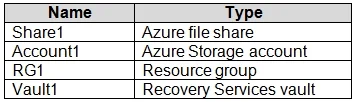
Hotspot Question You have an Azure subscription named Subscrption1 that is associated to an Azure Active Directory (Azure AD) tenant named AAD1. Subscription1 contains the objects in the following…
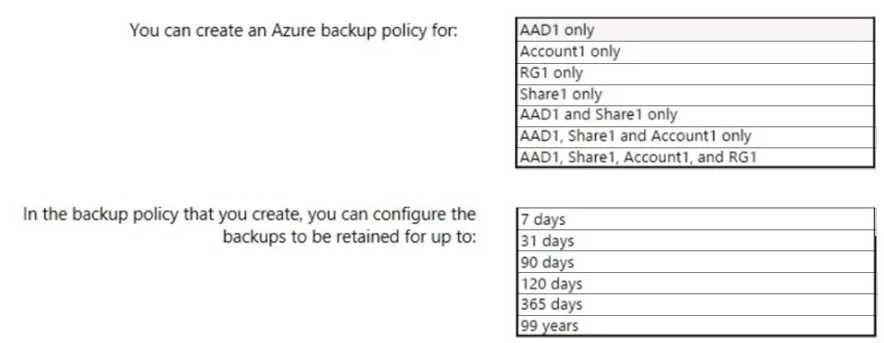
The correct answer is Share1 = Yes; Account1 = No; RG1 = No; Vault1 = No. An Azure Recovery Services vault backup policy can be targeted at an Azure file share (Share1) and leverages Long-Term Retention (LTR) to keep backups for up to 99 years.
Question
Exhibits
Answer Area
- Share1Yes
- Account1No
- RG1No
- Vault1No
Explanation
An Azure Recovery Services vault backup policy can be targeted at an Azure file share (Share1) and leverages Long-Term Retention (LTR) to keep backups for up to 99 years.
Approach. First, select 'Share1 only'. A Recovery Services vault is used to back up specific supported workloads such as Azure File shares, Azure Virtual Machines, and databases (SQL/SAP HANA). You cannot apply a Recovery Services vault backup policy to an Azure AD tenant, an entire Resource Group, or an entire Storage account. Therefore, Share1 is the only valid target. Second, select '99 years'. Azure Backup utilizes a Grandfather-Father-Son (GFS) retention scheme that allows Long-Term Retention (LTR) of backup points for up to 99 years. Even though specific workloads (like Azure File shares) have historically had a 10-year maximum retention limit in the portal, 10 years is not an option in the provided list. Microsoft exams often test the overarching absolute maximum LTR capability of the Azure Backup service, which is 99 years.
Common mistakes.
- common_mistake. A common mistake is selecting 'Account1'. While Azure File shares reside inside storage accounts, the Recovery Services backup policy is configured to target the file share itself, not the parent storage account object. Another mistake is choosing 365 days for retention, assuming a 1-year limit; however, Azure Backup is designed for compliance archiving, making the 99-year limit the correct theoretical maximum.
Concept tested. Recovery Services Vault Supported Workloads and Azure Backup LTR (Long-Term Retention) Maximums
Reference. https://learn.microsoft.com/en-us/azure/backup/backup-overview
Topics
Community Discussion
No community discussion yet for this question.