
AZ-104 · Question #257
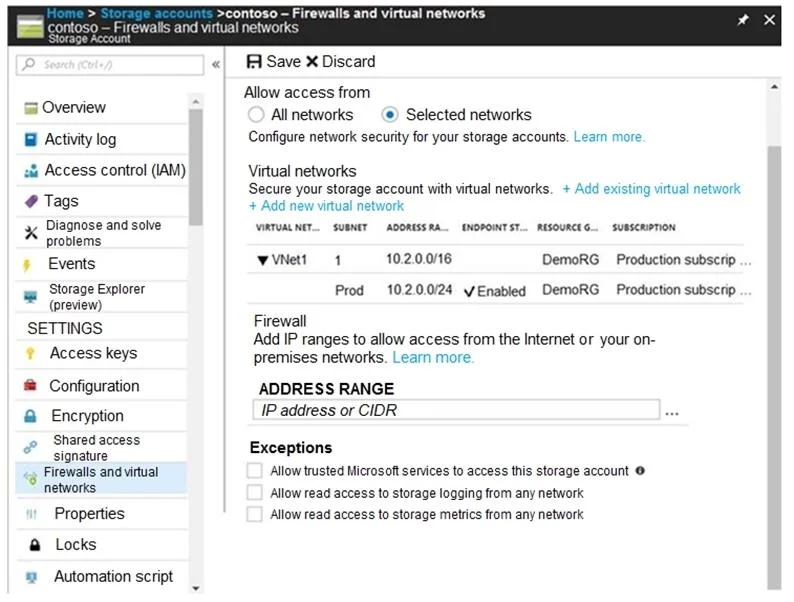
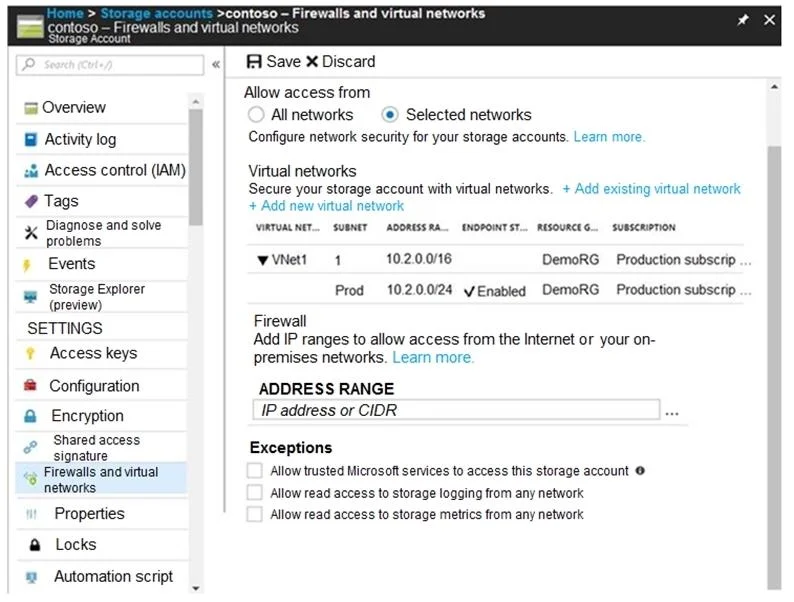
Hotspot Question You have several Azure virtual machines on a virtual network named VNet1. You configure an Azure Storage account as shown in the following exhibit. Use the drop-down menus to select…
The correct answer is Allow access from: Selected networks; Subnet Prod 10.2.0.0/24: Enabled. The correct selections are 'never' for both statements because the 10.2.9.0/24 subnet is not explicitly allowed, and the exception for trusted Microsoft services (like Azure Backup) is disabled.
Question
Exhibits
Answer Area
- Allow access fromSelected networksAll networksSelected networks
- Subnet Prod 10.2.0.0/24EnabledEnabledDisabled
Explanation
The correct selections are 'never' for both statements because the 10.2.9.0/24 subnet is not explicitly allowed, and the exception for trusted Microsoft services (like Azure Backup) is disabled.
Approach. To answer the question, we must analyze the two statements based on the configuration shown in the first exhibit.
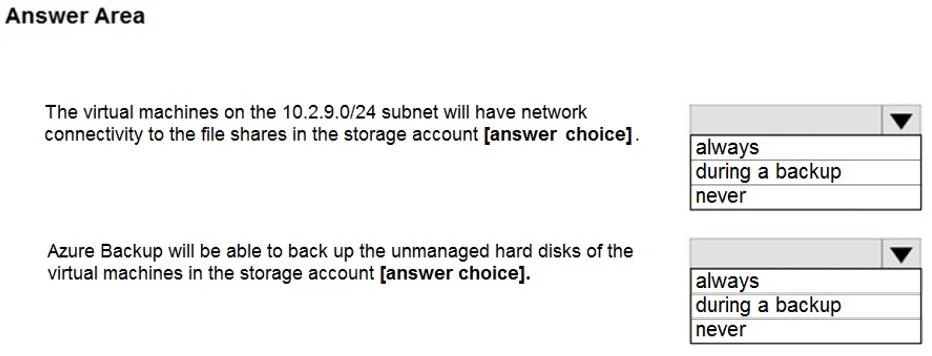
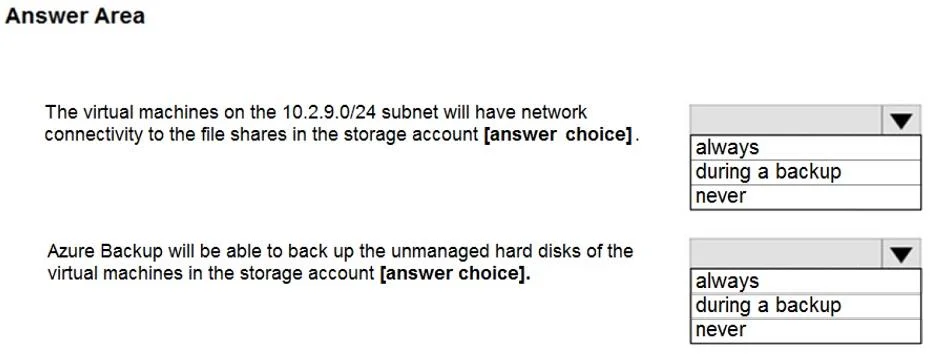
Statement 1: 'The virtual machines on the 10.2.9.0/24 subnet will have network connectivity to the file shares in the storage account [answer choice].'
- The storage account's network access is restricted to 'Selected networks'.
- In the 'Virtual networks' section, only the
10.2.0.24/24subnet ofVNet1is explicitly enabled with a service endpoint for storage. The10.2.9.0/24subnet is not listed as an allowed network. - Therefore, virtual machines residing in the
10.2.9.0/24subnet will not have connectivity to the storage account. - Correct choice for Statement 1: never
Statement 2: 'Azure Backup will be able to back up the unmanaged hard disks of the virtual machines in the storage account [answer choice].'
- Azure Backup is considered a 'trusted Microsoft service'.
- In the 'Exceptions' section of the first exhibit, the option 'Allow trusted Microsoft services to access this storage account' is unchecked.
- When this option is unchecked, trusted Microsoft services are prevented from accessing the storage account if 'Selected networks' is enabled and they are not explicitly allowed via VNet service endpoints or IP rules.
- Since Azure Backup requires access to the storage account (where the disks might reside or where backups might be stored) and the exception is disabled, Azure Backup will be unable to perform its function.
- Correct choice for Statement 2: never
Common mistakes.
- common_mistake. 1. For Statement 1 (10.2.9.0/24 subnet connectivity): Choosing 'always' or 'during a backup'. A common mistake is to assume that since
10.2.9.0/24is within the broader10.2.0.0/16VNet range, it would automatically have access. However, VNet service endpoints for storage are configured at the subnet level. Only10.2.0.24/24is explicitly enabled, not the entireVNet1or other subnets within it. 'During a backup' is not relevant to general network connectivity.
- For Statement 2 (Azure Backup capability): Choosing 'always' or 'during a backup'. The most common mistake here is to overlook the critical detail that the 'Allow trusted Microsoft services to access this storage account' checkbox is unchecked in the primary exhibit. Many candidates might assume that trusted Microsoft services always have access or that the checkbox refers to other services, but it directly impacts services like Azure Backup, Azure Monitor, etc., when network rules are restrictive. If that checkbox were checked (as in the third exhibit), then 'always' would be the correct answer for Azure Backup.
Concept tested. Azure Storage Account network security, specifically Virtual Network service endpoints, and the 'Allow trusted Microsoft services' exception for secured storage accounts.
Topics
Community Discussion
No community discussion yet for this question.