
AZ-104 · Question #704
Hotspot Question You have an Azure subscription that contains a storage account named storage1. The storage1 account contains blobs in a container named container1. You plan to share access to…
The correct answer is Blob = Yes; File = No; Queue = No; Table = No; Service = No; Container = Yes; Object = Yes; Read = Yes; Write = No; Delete = No; List = Yes; Add = No; Create = No; Update = No; Process = No; Immutable storage = No; Permanent delete = No; Enables deletion of versions = No; Read/Write = No; Filter = No. To enable enumeration and download of blobs within a specific container using the principle of least privilege, the SAS must grant 'Blob' service access, 'Container' and 'Object' resource types, and 'Read' and 'List' permissions.
Question
Exhibit
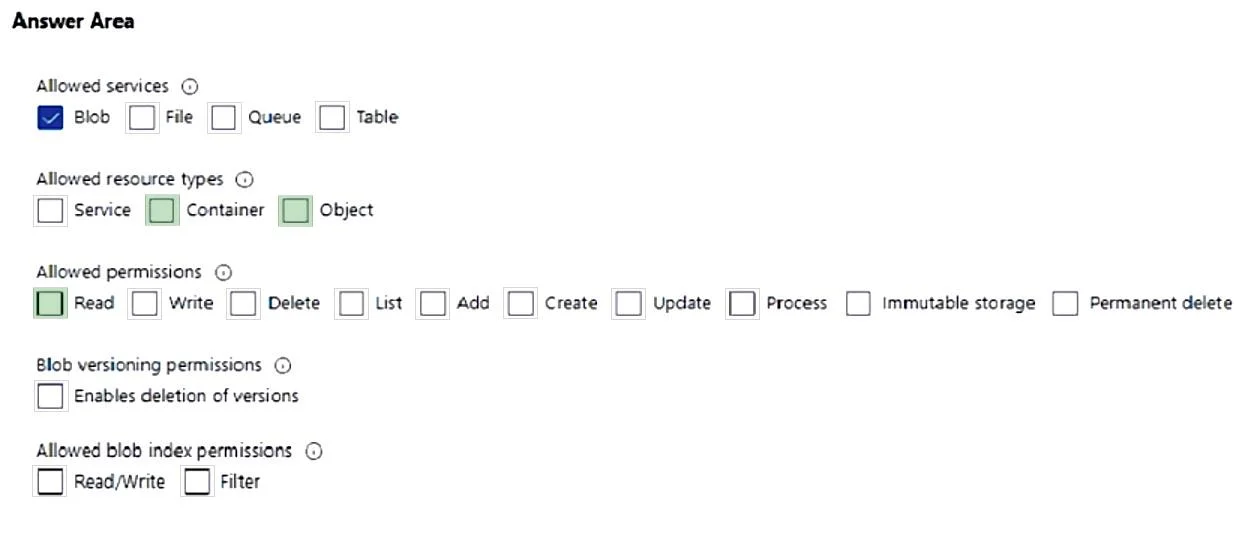
Answer Area
- BlobYes
- FileNo
- QueueNo
- TableNo
- ServiceNo
- ContainerYes
- ObjectYes
- ReadYes
- WriteNo
- DeleteNo
- ListYes
- AddNo
- CreateNo
- UpdateNo
- ProcessNo
- Immutable storageNo
- Permanent deleteNo
- Enables deletion of versionsNo
- Read/WriteNo
- FilterNo
Explanation
To enable enumeration and download of blobs within a specific container using the principle of least privilege, the SAS must grant 'Blob' service access, 'Container' and 'Object' resource types, and 'Read' and 'List' permissions.
Approach. The question asks to generate a Shared Access Signature (SAS) that can only be used to enumerate and download blobs stored in 'container1', adhering to the principle of least privilege. Based on the green highlights in the provided answer images, the correct interaction involves selecting the following five checkboxes:
-
Allowed services: Blob
- Reasoning: The scenario explicitly states the storage account contains 'blobs', making the Blob service the correct choice for the SAS scope. While shown pre-checked in blue, its green highlight confirms it's a necessary component of the solution.
-
Allowed resource types: Container
- Reasoning: To 'enumerate' (list) blobs within 'container1', the SAS needs permission to access and perform operations at the container level. Selecting 'Container' as a resource type provides this necessary scope.
-
Allowed resource types: Object
- Reasoning: To 'download' individual blobs, the SAS needs permission to access and perform operations on the blobs themselves, which are considered 'Objects' in Azure Storage. Selecting 'Object' as a resource type provides this necessary scope.
-
Allowed permissions: Read
- Reasoning: The requirement to 'download blobs' directly translates to needing the 'Read' permission, which allows users to read blob content.
-
Allowed permissions: List
- Reasoning: The requirement to 'enumerate blobs' directly translates to needing the 'List' permission, which allows users to list the blobs within a container.
Note on 'three settings': The question asks to enable 'three settings', but the visual answer shows five highlighted options. In such cases, the visual representation (green highlights) takes precedence as the intended solution, suggesting a potential discrepancy in the question's numerical requirement. The combination of these five settings ensures precise, least-privilege access for enumerating and downloading blobs within the specified container.
Common mistakes.
- common_mistake. Common mistakes include:
- Selecting 'Allowed resource types: Service': This grants permissions at the service level (e.g., getting service properties), which is too broad and not required for container- or object-level operations, violating the principle of least privilege.
- Selecting 'Write', 'Delete', 'Add', 'Create', 'Update', or other permissions under 'Allowed permissions': These permissions grant additional privileges beyond just 'enumerate' and 'download'. Granting any of these would violate the principle of least privilege, which explicitly states the SAS should only be used for the specified actions.
- Omitting 'Allowed resource types: Container' or 'Object': Not selecting 'Container' would prevent listing blobs within it, and not selecting 'Object' would prevent downloading individual blobs. Both are essential for the requirements.
- Omitting 'Allowed permissions: Read' or 'List': 'Read' is for downloading, and 'List' is for enumerating. Omitting either would fail to meet a core requirement of the question.
- Selecting any 'Blob versioning permissions' or 'Allowed blob index permissions': These are not relevant to the basic enumeration and download requirements.
Concept tested. Azure Storage Shared Access Signatures (SAS) configuration, understanding resource types (Service, Container, Object) and permissions (Read, List) for Blob storage, and applying the principle of least privilege in access control.
Reference. null
Topics
Community Discussion
No community discussion yet for this question.