
AZ-104 · Question #500
You have the Azure virtual machines shown in the following table. VNET1 is linked to a private DNS zone named contoso.com that contains the records shown in the following table. You need to ping VM2…
The correct answer is C. comp2.contoso.com only. You can lookup for any DNS records by using command line cmd: 1. nslookup -q=ptr google.com "PTR record" 2. nslookup -q=a google.com "A record" "IP address" 3. nslookup -q=mx google.com "Mail exchange record " 4. nslookup -q=cname google.com "Alias name" 5. nslookup -q=txt…
Question
Exhibits
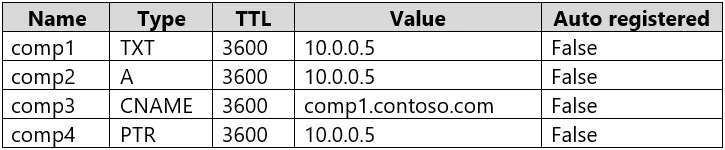
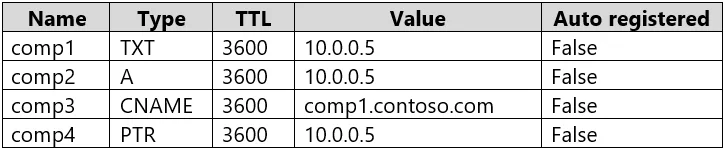
Options
- Acomp2.contoso.com and comp4.contoso.com only
- Bcomp1.contoso.com, comp2.contoso.com, comp3.contoso.com, and comp4.contoso.com
- Ccomp2.contoso.com only
- Dcomp1.contoso.com and comp2.contoso.com only
- Ecomp1.contoso.com, comp2.contoso.com, and comp4.contoso.com only
How the community answered
(22 responses)- A23% (5)
- B9% (2)
- C59% (13)
- D5% (1)
- E5% (1)
Explanation
You can lookup for any DNS records by using command line cmd: 1. nslookup -q=ptr google.com "PTR record" 2. nslookup -q=a google.com "A record" "IP address" 3. nslookup -q=mx google.com "Mail exchange record " 4. nslookup -q=cname google.com "Alias name" 5. nslookup -q=txt google.com "info" 6. nslookup -q=ns google.com "Identify DNS servers" 7. nslookup -q=dchid google.com "Inormation related to DHCP"
Community Discussion
No community discussion yet for this question.