
AZ-104 · Question #679
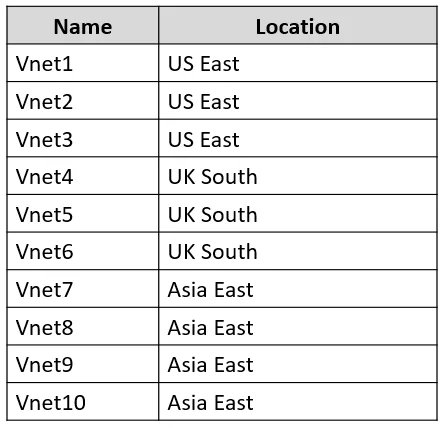
You have an Azure subscription that contains the virtual networks shown in the following table. All the virtual networks are peered. Each virtual network contains nine virtual machines. You need to…
The correct answer is A. 1. Azure Bastion and VNet peering can be used together. When VNet peering is configured, you don't have to deploy Azure Bastion in each peered VNet. This means if you have an Azure Bastion host configured in one virtual network (VNet), it can be used to connect to VMs deployed in…
Question
Exhibits
Options
- A1
- B3
- C9
- D10
How the community answered
(42 responses)- A74% (31)
- B14% (6)
- C7% (3)
- D5% (2)
Explanation
Azure Bastion and VNet peering can be used together. When VNet peering is configured, you don't have to deploy Azure Bastion in each peered VNet. This means if you have an Azure Bastion host configured in one virtual network (VNet), it can be used to connect to VMs deployed in a peered VNet without deploying an additional bastion host. For more information about VNet peering, see About virtual network peering. Azure Bastion works with the following types of peering: - Virtual network peering: Connect virtual networks within the same Azure region. - Global virtual network peering: Connecting virtual networks across Azure regions.
Community Discussion
No community discussion yet for this question.