
AZ-104 · Question #633
Drag and Drop Question You have a Windows 11 device named Device and an Azure subscription that contains the resources shown in the following table. Device1 has Azure PowerShell and Azure…
The correct answer is Upgrade Bastion1 to the Standard SKU; From Bastion1, select Native Client Support; From Azure CLI on Device1, run az network bastion rdp. Azure Bastion Native RDP - Exam Explanation The Core Concept Azure Bastion normally provides browser-based RDP/SSH. This scenario requires a native client RDP connection (using the local Azure CLI tunnel instead of a browser). That capability has prerequisites locked behind the…
Question
Exhibits
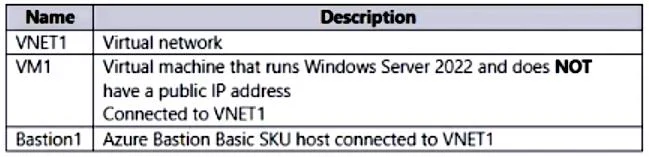
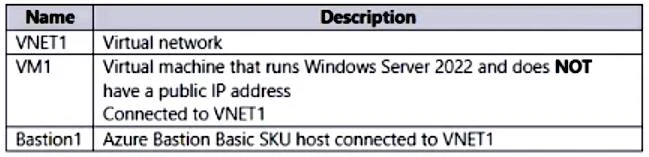
Answer Area
Drag items
Correct arrangement
- Upgrade Bastion1 to the Standard SKU
- From Bastion1, select Native Client Support
- From Azure CLI on Device1, run az network bastion rdp.
Explanation
Azure Bastion Native RDP - Exam Explanation
The Core Concept
Azure Bastion normally provides browser-based RDP/SSH. This scenario requires a native client RDP connection (using the local Azure CLI tunnel instead of a browser). That capability has prerequisites locked behind the Standard SKU.
Step-by-Step Breakdown
Step 1: Upgrade Bastion1 to the Standard SKU
Why first? Native Client Support is a feature exclusive to the Standard SKU. The Basic SKU physically cannot enable it. Without upgrading, Step 2 is impossible - the option doesn't exist in the portal. This is a hard prerequisite gate.
Step 2: From Bastion1, select Native Client Support
Why second? Even on Standard SKU, Native Client Support is off by default - it must be explicitly enabled on the Bastion resource. This unlocks the ability for clients to tunnel RDP over the Bastion plane using the Azure CLI. Without this toggle, the CLI command in Step 3 returns an error.
Step 3: From Azure CLI on Device1, run az network bastion rdp
Why last? This is the actual connection command. It tunnels RDP traffic through the Bastion host to VM1 - no public IP on VM1 is needed. The CLI handles the tunnel establishment and invokes the native RDP client automatically. This only works after both previous steps are complete.
Why the Other Options Are Wrong
| Option | Why Excluded |
|---|---|
| On Device1, run mstsc.exe | az network bastion rdp launches the native RDP session itself. You don't manually open mstsc.exe - the CLI orchestrates it. |
| From VM1, enable JIT VM access | JIT (Just-in-Time) opens NSG ports on demand. Bastion doesn't need open ports or a public IP on VM1 - that's its entire purpose. JIT and Bastion are independent security mechanisms. |
| From Bastion1, enable Kerberos authentication | Kerberos auth is an optional Bastion feature for domain-joined scenarios. It is not required to establish a native RDP connection. |
Common Misconceptions
- "JIT is always needed for RDP" - Only when connecting directly via public IP. Bastion bypasses this requirement entirely.
- "mstsc.exe is the action" - The exam-relevant action is the CLI command; mstsc may be invoked under the hood, but it's not the step you perform.
- "Native Client works on Basic SKU" - It does not. Forgetting the SKU upgrade causes the entire flow to fail and is the most common trap in this question.
Topics
Community Discussion
No community discussion yet for this question.