
AZ-104 · Question #376
Hotspot Question Your company has offices in New York and Los Angeles. You have an Azure subscription that contains an Azure virtual network named VNet1. Each office has a site-to-site VPN…
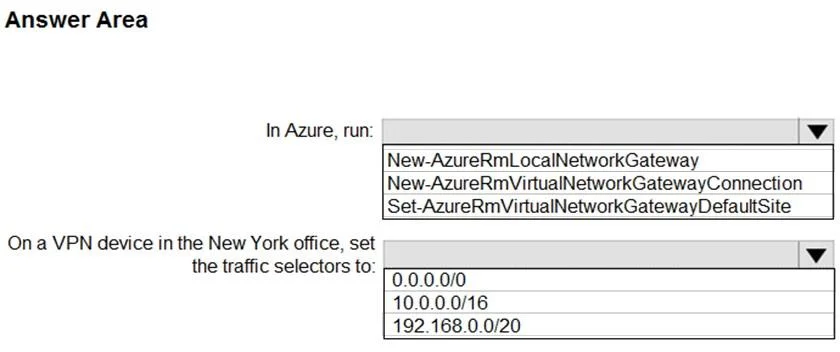
The correct answer is In Azure, run:: Set-AzureRmVirtualNetworkGatewayDefaultSite; On a VPN device in the New York office, set the traffic selectors to:: 0.0.0.0/0. To force all Internet-bound traffic from Azure VNet1 through the New York office, you must configure forced tunneling on the Azure VPN Gateway and set the traffic selectors on the New York office's VPN device to include the default route.
Question
Exhibit
Answer Area
- In Azure, run:Set-AzureRmVirtualNetworkGatewayDefaultSiteNew-AzureRmLocalNetworkGatewayNew-AzureRmVirtualNetworkGatewayConnectionSet-AzureRmVirtualNetworkGatewayDefaultSite
- On a VPN device in the New York office, set the traffic selectors to:0.0.0.0/00.0.0.0/010.0.0.0/16192.168.0.0/20
Explanation
To force all Internet-bound traffic from Azure VNet1 through the New York office, you must configure forced tunneling on the Azure VPN Gateway and set the traffic selectors on the New York office's VPN device to include the default route.
Approach. The question requires routing all Internet-bound traffic from VNet1 through the New York office. This scenario is known as 'Forced Tunneling' in Azure VPN Gateway.
-
In Azure, run: To configure forced tunneling, you need to set a default site for the Azure Virtual Network Gateway, which designates an on-premises site as the path for all Internet-bound traffic (0.0.0.0/0) originating from Azure. The
Set-AzureRmVirtualNetworkGatewayDefaultSitePowerShell cmdlet is specifically designed for this purpose. The other cmdlets (New-AzureRmLocalNetworkGatewayandNew-AzureRmVirtualNetworkGatewayConnection) are for creating new network gateways or connections, not for modifying default routing behavior. -
On a VPN device in the New York office, set the traffic selectors to: For the forced tunneling to work correctly, the on-premises VPN device in the New York office must be configured to accept and route the Internet-bound traffic (0.0.0.0/0) that Azure sends to it. This is typically achieved by setting the VPN device's traffic selectors (also known as interesting traffic or proxy IDs) to
0.0.0.0/0. This tells the on-premises device that all traffic matching this range should be handled by the VPN tunnel. The other options (10.0.0.0/16and192.168.0.0/20) represent private IP ranges and would only route traffic destined for those specific internal networks, not general Internet traffic.
Therefore, the correct selections are Set-AzureRmVirtualNetworkGatewayDefaultSite for the first dropdown and 0.0.0.0/0 for the second dropdown.
Common mistakes.
- common_mistake. A common mistake is selecting the wrong PowerShell cmdlet or an incorrect IP range for traffic selectors.
- Incorrect Cmdlets: Choosing
New-AzureRmLocalNetworkGatewayorNew-AzureRmVirtualNetworkGatewayConnectionis incorrect because these cmdlets are used for initial setup of network gateways and connections, respectively. The scenario implies existing connections and requires a modification to routing behavior, not new resource creation. - Incorrect Traffic Selector: Selecting
10.0.0.0/16or192.168.0.0/20for traffic selectors on the on-premises VPN device is wrong because these are private IP address ranges. Setting traffic selectors to these values would only route traffic destined for those specific private networks over the VPN, not all Internet-bound traffic. The requirement is to route all Internet-bound traffic, which corresponds to the0.0.0.0/0address space.
Concept tested. Azure VPN Gateway Forced Tunneling, understanding of default routing (0.0.0.0/0), Azure PowerShell cmdlets for VPN Gateway configuration, and VPN traffic selectors on on-premises devices.
Reference. https://docs.microsoft.com/en-us/azure/vpn-gateway/vpn-gateway-forced-tunneling-powershell
Topics
Community Discussion
No community discussion yet for this question.