
AZ-104 · Question #499
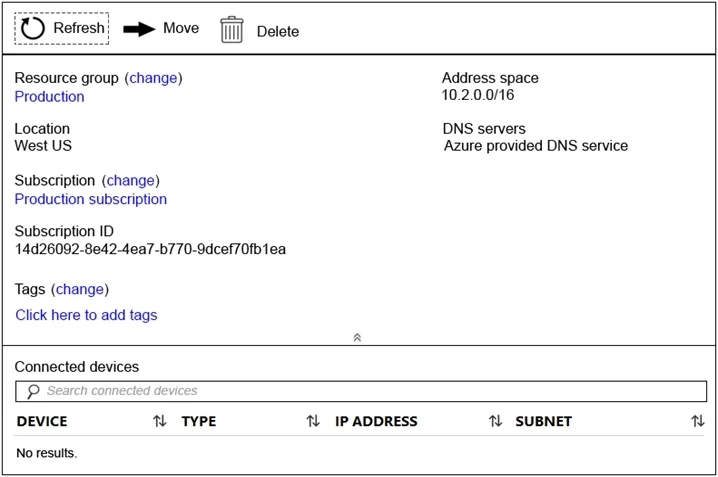
You have a virtual network named VNet1 as shown in the exhibit. (Click the Exhibit tab.) No devices are connected to VNet1. You plan to peer VNet1 to another virtual network named VNet2. VNet2 has…
The correct answer is A. Modify the address space of VNet1. The virtual networks you peer must have non-overlapping IP address spaces. The exhibit indicates that VNet1 has an address space of 10.2.0.0/16, which is the same as VNet2, and thus overlaps. We need to change the address space for VNet1…
Question
Exhibits
Options
- AModify the address space of VNet1.
- BAdd a gateway subnet to VNet1.
- CCreate a subnet on VNet1 and VNet2.
- DConfigure a service endpoint on VNet2.
How the community answered
(62 responses)- A84% (52)
- B2% (1)
- C10% (6)
- D5% (3)
Explanation
The virtual networks you peer must have non-overlapping IP address spaces. The exhibit indicates that VNet1 has an address space of 10.2.0.0/16, which is the same as VNet2, and thus overlaps. We need to change the address space for VNet1. https://docs.microsoft.com/en-us/azure/virtual-network/virtual-network-manage- peering#requirements-and-constraints https://docs.microsoft.com/en-us/azure/virtual-network/virtual-networks-faq
Community Discussion
No community discussion yet for this question.