
AZ-104 · Question #402
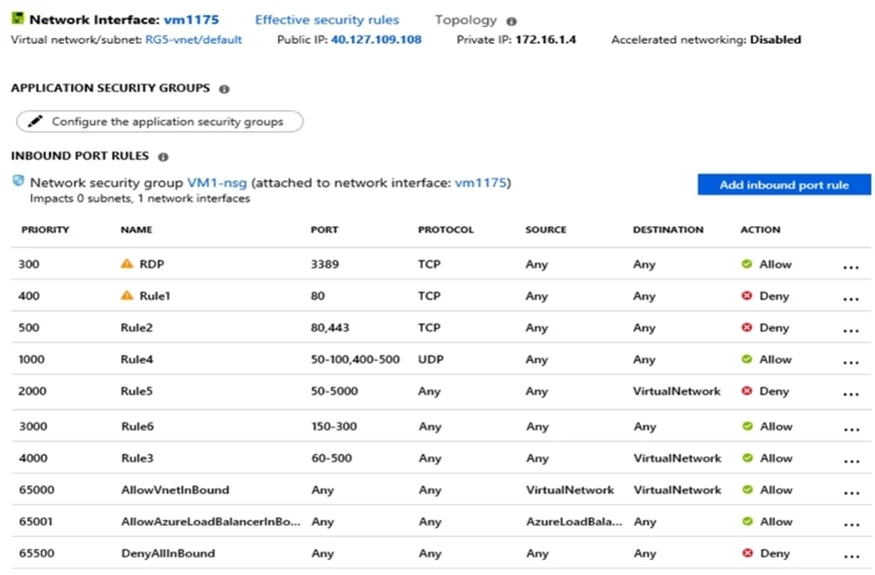
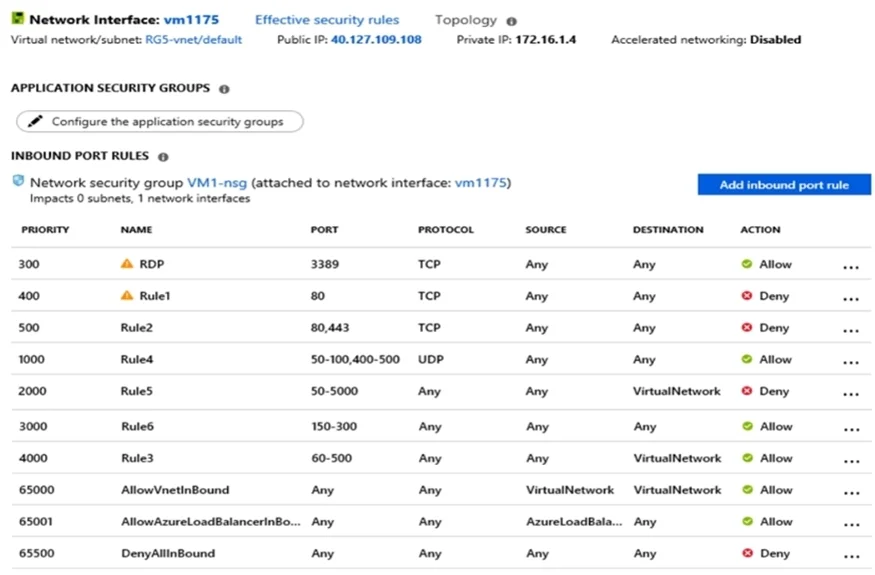
You have an Azure virtual machine named VM1. The network interface for VM1 is configured as shown in the exhibit. (Click the Exhibit tab.) You deploy a web server on VM1, and then create a secure…
The correct answer is B. For Rule5, change the Action to Allow and change the priority to 401. Rule 2 is blocking HTTPS access (port 443) and has a priority of 500. Changing Rule 5 (ports 50-5000) and giving it a lower priority number will allow access on port Note: Rules are processed in priority order, with lower numbers processed before higher numbers, because lower…
Question
Exhibits
Options
- ACreate a new inbound rule that allows TCP protocol 443 and configure the protocol to have a
- BFor Rule5, change the Action to Allow and change the priority to 401.
- CDelete Rule1.
- DModify the protocol of Rule4.
How the community answered
(35 responses)- A11% (4)
- B80% (28)
- C6% (2)
- D3% (1)
Explanation
Rule 2 is blocking HTTPS access (port 443) and has a priority of 500. Changing Rule 5 (ports 50-5000) and giving it a lower priority number will allow access on port Note: Rules are processed in priority order, with lower numbers processed before higher numbers, because lower numbers have higher priority. Once traffic matches a rule, processing Incorrect Answers: A: Rule 2 is blocking HTTPS access (port 443) and has a priority of 500. Creating a rule for the same protocol (443) with a higher priority number will not help. C: Rule 1 blocks access to port 80, which is used for HTTP, not HTTPS. D: Rule 2 is blocking HTTPS access (port 443). Changing Rule 4 allows access on UDP but is a higher priority number than Rule. Changing the protocol on Rule 4 to TCP will not help if we don't also change the priority to a lower number. https://docs.microsoft.com/en-us/azure/virtual-network/security-overview
Community Discussion
No community discussion yet for this question.