
AZ-104 · Question #386
Hotspot Question You are creating an Azure load balancer. You need to add an IPv6 load balancing rule to the load balancer. How should you complete the Azure PowerShell script? To answer, select the…
The correct answer is $rule1 =: New-AzureRmLoadBalancerRuleConfig; New-AzureRmLoadBalancer -ResourceGroupName AdatumR0 -Name 'AdatumIPv6LB' -Location 'East US' -FrontendIpConfiguration $FEConfigv6 -BackendAddressPool $backpoolipv6 -Probe $Probe: -LoadBalancingRule. To add an IPv6 load balancing rule to an Azure load balancer using PowerShell, first define the new rule configuration, then associate it with the load balancer during creation.
Question
Exhibits
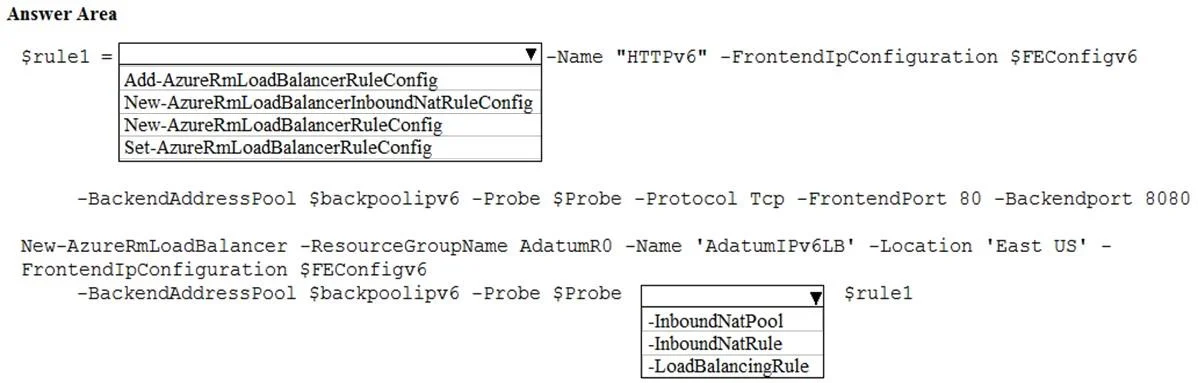
Answer Area
- $rule1 =New-AzureRmLoadBalancerRuleConfigAdd-AzureRmLoadBalancerRuleConfigNew-AzureRmLoadBalancerInboundNatRuleConfigNew-AzureRmLoadBalancerRuleConfigSet-AzureRmLoadBalancerRuleConfig
- New-AzureRmLoadBalancer -ResourceGroupName AdatumR0 -Name 'AdatumIPv6LB' -Location 'East US' -FrontendIpConfiguration $FEConfigv6 -BackendAddressPool $backpoolipv6 -Probe $Probe-LoadBalancingRule-InboundNatPool-InboundNatRule-LoadBalancingRule
Explanation
To add an IPv6 load balancing rule to an Azure load balancer using PowerShell, first define the new rule configuration, then associate it with the load balancer during creation.
Approach. 1. For the first dropdown ($rule1 = ...): The correct selection is New-AzureRmLoadBalancerRuleConfig. This cmdlet is used to create a new load balancing rule object in memory, defining its properties such as name, frontend IP configuration, backend address pool, probe, protocol, frontend port, and backend port. The parameters provided in the script line (e.g., -Name "HTTPv6", -FrontendIpConfiguration, -BackendAddressPool, -Protocol Tcp, -FrontendPort 80, -Backendport 8080) are all specific to defining a standard load balancing rule configuration.
2. For the second dropdown (New-AzureRmLoadBalancer ... $rule1): The correct selection is -LoadBalancingRule. When creating a new Azure Load Balancer using New-AzureRmLoadBalancer, the -LoadBalancingRule parameter is used to associate one or more pre-defined load balancing rule objects (like the $rule1 variable in this case) with the load balancer being created. This links the rule configuration to the new load balancer.
Common mistakes.
- common_mistake. 1. For the first dropdown:
Add-AzureRmLoadBalancerRuleConfig: This cmdlet is used to add a rule to an existing load balancer, not to create a new rule configuration object from scratch, which is what is happening when$rule1is being defined.New-AzureRmLoadBalancerInboundNatRuleConfig: This cmdlet is for creating Inbound NAT rules, which map specific ports to individual backend instances. The provided parameters (like-BackendAddressPool) and the intent of load balancing multiple backend instances indicate a standard load balancing rule, not an Inbound NAT rule.Set-AzureRmLoadBalancerRuleConfig: This cmdlet is used to modify an existing rule configuration, not to create a new one.
- For the second dropdown:
-InboundNatPoolor-InboundNatRule: These parameters are used to associate Inbound NAT pool or Inbound NAT rule configurations, respectively, with a load balancer. Since$rule1was created usingNew-AzureRmLoadBalancerRuleConfig(a load balancing rule), attempting to associate it as an Inbound NAT configuration would be incorrect and likely result in an error or an invalid load balancer setup.
Concept tested. Azure Load Balancer configuration and management using Azure PowerShell, specifically focusing on creating load balancing rule configurations (New-AzureRmLoadBalancerRuleConfig) and associating them with a new load balancer (New-AzureRmLoadBalancer with the -LoadBalancingRule parameter). This tests understanding of the different types of load balancer rules and the correct cmdlets/parameters for their deployment.
Topics
Community Discussion
No community discussion yet for this question.