
AZ-104 · Question #372
Hotspot Question You have an Azure web app named WebApp1 that runs in an Azure App Service plan named ASP1. ASP1 is based on the D1 pricing tier. You need to ensure that WebApp1 can be accessed only…
The correct answer is Pricing tier for ASP1:: P1v2; Settings for WebApp1:: Networking. This question tests your knowledge of Azure App Service network access restrictions and the requirements needed to integrate with on-premises networks while minimizing costs.
Question
Exhibit
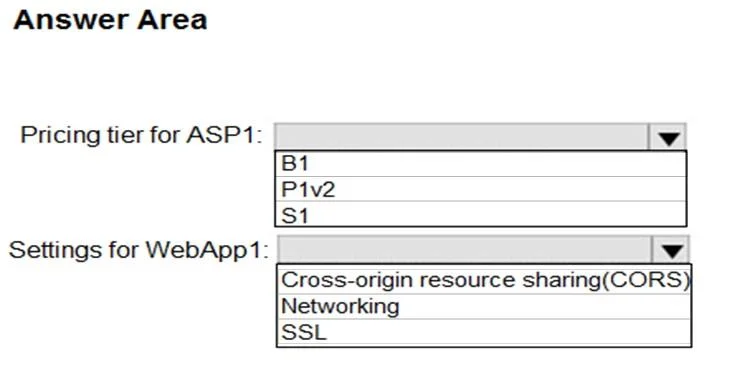
Answer Area
- Pricing tier for ASP1:P1v2B1P1v2S1
- Settings for WebApp1:NetworkingCross-origin resource sharing(CORS)NetworkingSSL
Explanation
This question tests your knowledge of Azure App Service network access restrictions and the requirements needed to integrate with on-premises networks while minimizing costs.
Approach. To restrict WebApp1 access to only on-premises computers, you need to upgrade ASP1 from the D1 (Shared) tier to at least the B1 (Basic) tier, because Access Restrictions (IP-based rules) are available starting from the Basic tier. Then, under the 'Networking' section of WebApp1, you configure 'Access Restrictions' by adding an 'Allow' rule for your on-premises network's IP address range (CIDR block) and setting a 'Deny All' rule for everything else. The D1 Shared tier does not support Access Restrictions, so upgrading to Basic is the minimum cost upgrade required. No VPN or Service Endpoint is needed here since simple IP-based access restrictions suffice for this requirement.
Concept tested. Azure App Service Access Restrictions, pricing tier requirements for network features, and on-premises network access control using IP allow-listing.
Reference. https://docs.microsoft.com/en-us/azure/app-service/app-service-ip-restrictions
Topics
Community Discussion
No community discussion yet for this question.