
AZ-104 · Question #371
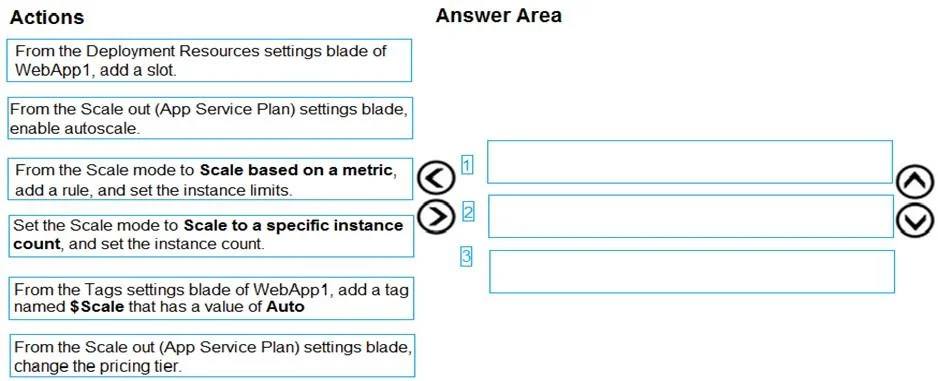
Drag and Drop Question You are developing an Azure web app named WebApp1. WebApp1 uses an Azure App Service plan named Plan1 that uses the B1 pricing tier. You need to configure WebApp1 to add…
The correct answer is From the Scale out (App Service Plan) settings blade, change the pricing tier.; From the Scale out (App Service Plan) settings blade, enable autoscale.; From the Scale mode to Scale based on a metric, add a rule, and set the instance limits. To enable CPU-based autoscaling on an Azure App Service, you must first upgrade the App Service Plan from B1 to a tier that supports autoscale (Standard or higher) via the Scale out blade, then enable the Custom Autoscale feature, and finally set the Scale mode to 'Scale based…
Question
Exhibit
Answer Area
Drag items
Correct arrangement
- From the Scale out (App Service Plan) settings blade, change the pricing tier.
- From the Scale out (App Service Plan) settings blade, enable autoscale.
- From the Scale mode to Scale based on a metric, add a rule, and set the instance limits.
Explanation
To enable CPU-based autoscaling on an Azure App Service, you must first upgrade the App Service Plan from B1 to a tier that supports autoscale (Standard or higher) via the Scale out blade, then enable the Custom Autoscale feature, and finally set the Scale mode to 'Scale based on a metric,' add a CPU rule with the 70% threshold over 10 minutes, and configure the instance limits. The B1 (Basic) tier does not support autoscale natively, so a plan change is the prerequisite step. The three correct actions in sequence are: (1) From the Scale out (App Service Plan) settings blade, change the pricing tier to one that supports autoscale; (2) From the Scale out (App Service Plan) settings blade, enable autoscale; (3) Set the Scale mode to Scale based on a metric, add a rule, and set the instance limits.
Topics
Community Discussion
No community discussion yet for this question.