
AZ-104 · Question #373
Hotspot Question You have an Azure web app named WebApp1. You need to provide developers with a copy of WebApp1 that they can modify without affecting the production WebApp1. When the developers…
The correct answer is -ResourceGroupName AdatumWebApps -Name WebApp1 -AppServicePlan ADatumASP1: New-AzureRMWebAppSlot; WebApp1 -Slot Staging: -SourceWebApp. This question tests knowledge of Azure App Service deployment slots, which allow you to create staging environments for web apps without affecting production. Deployment slots enable zero-downtime deployments by allowing you to swap slot content into production.
Question
Exhibit
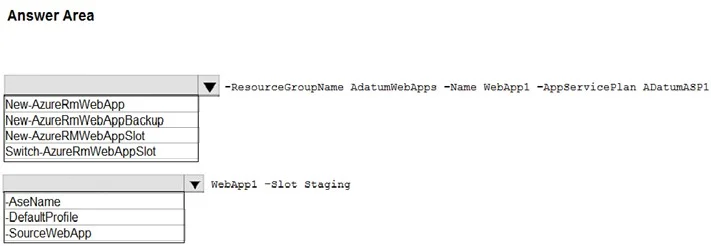
Answer Area
- -ResourceGroupName AdatumWebApps -Name WebApp1 -AppServicePlan ADatumASP1New-AzureRMWebAppSlotNew-AzureRmWebAppNew-AzureRmWebAppBackupNew-AzureRMWebAppSlotSwitch-AzureRmWebAppSlot
- WebApp1 -Slot Staging-SourceWebApp-AseName-DefaultProfile-SourceWebApp
Explanation
This question tests knowledge of Azure App Service deployment slots, which allow you to create staging environments for web apps without affecting production. Deployment slots enable zero-downtime deployments by allowing you to swap slot content into production.
Approach. The correct command to prepare the environment is 'az webapp deployment slot create --name WebApp1 --resource-group <ResourceGroup> --slot staging'. This creates a new deployment slot (e.g., named 'staging') for WebApp1 where developers can deploy and test their changes independently. Once testing is complete, you use 'az webapp deployment slot swap --name WebApp1 --resource-group <ResourceGroup> --slot staging' to swap the staging slot into production, instantly switching which version of the app is live. Deployment slots are a feature of Standard, Premium, and Isolated App Service plans, so the plan must be at one of these tiers. The swap operation is near-instantaneous and includes the ability to swap back (swap with preview) if issues arise after promotion.
Concept tested. Azure App Service Deployment Slots - creating staging environments using 'az webapp deployment slot create' and swapping them to production using 'az webapp deployment slot swap' to enable zero-downtime deployments and easy rollback.
Reference. https://learn.microsoft.com/en-us/azure/app-service/deploy-staging-slots
Topics
Community Discussion
No community discussion yet for this question.