
AZ-104 · Question #223
Case Study 3 - Contoso, Ltd Overview Contoso, Ltd. is a consulting company that has a main office in Montreal and two branch offices in Seattle and New York. The Montreal office has 2,000 employees…
To connect the New York office to Azure using a site-to-site VPN, you must configure a virtual network gateway and a local network gateway in Azure, and a site-to-site VPN connection on the New York office's firewall.
Question
Exhibit
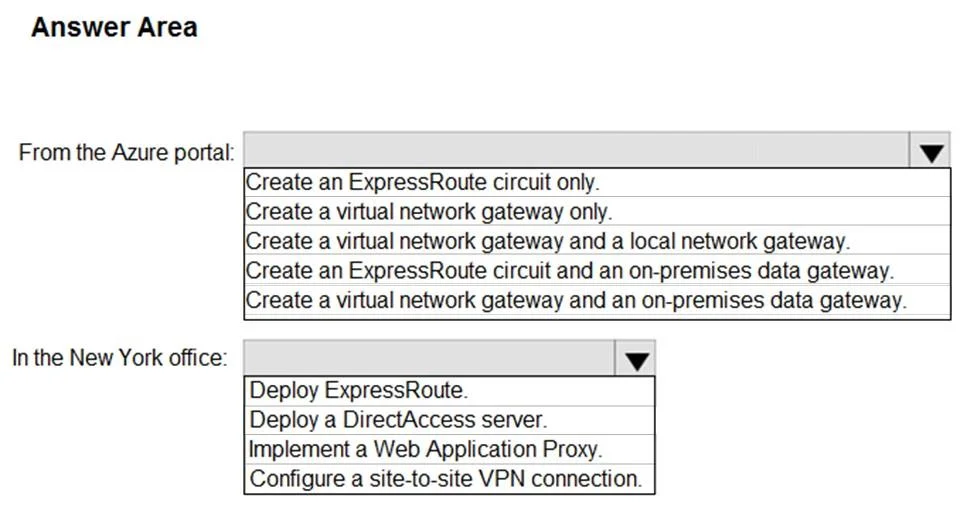
Answer Area
- From the Azure portal:Create an ExpressRoute circuit only.Create a virtual network gateway only.Create a virtual network gateway and a local network gateway.Create an ExpressRoute circuit and an on-premises data gateway.Create a virtual network gateway and an on-premises data gateway.
- In the New York office:Deploy ExpressRoute.Deploy a DirectAccess server.Implement a Web Application Proxy.Configure a site-to-site VPN connection.
Explanation
To connect the New York office to Azure using a site-to-site VPN, you must configure a virtual network gateway and a local network gateway in Azure, and a site-to-site VPN connection on the New York office's firewall.
Approach. The case study indicates that the New York office needs to connect to Azure, and states that on-premises firewalls 'can be configured as a VPN device'. The accompanying network diagram explicitly illustrates a site-to-site VPN connection between an on-premises network and an Azure Virtual Network.
Therefore, to establish this connectivity:
- From the Azure portal: You must create two main components for a site-to-site VPN. A Virtual Network Gateway acts as the VPN concentrator in Azure for the Virtual Network. A Local Network Gateway represents the on-premises VPN device and its network configuration to Azure. The option 'Create a virtual network gateway and a local network gateway' is the correct choice, as it provides both necessary Azure resources.
- In the New York office: Given that firewalls can be configured as VPN devices and a site-to-site VPN is being established, the appropriate action is to 'Configure a site-to-site VPN connection' on the on-premises VPN device (firewall). This involves setting up the IPSec tunnel parameters to connect to the Azure Virtual Network Gateway.
Common mistakes.
- common_mistake. 1. Choosing ExpressRoute options: While ExpressRoute provides a dedicated private connection, the case study's mention of 'firewall that can be configured as a VPN device' and the explicit VPN diagram strongly suggest a VPN solution, which is typically more cost-effective and faster to implement for initial connectivity compared to ExpressRoute. ExpressRoute circuits also require a connectivity provider, which isn't explicitly mentioned as being utilized for the New York office's Azure connection.
- 'Create a virtual network gateway only': This is insufficient for a site-to-site VPN, as the Local Network Gateway is required to define the on-premises VPN device and its IP ranges to Azure.
- Including 'on-premises data gateway': An on-premises data gateway is used for specific services (like Power BI, Logic Apps) to securely access on-premises data sources. It is not a component for establishing general network connectivity or an IPSec VPN tunnel between networks.
- 'Deploy a DirectAccess server': DirectAccess is a Windows Server feature for remote users to access internal network resources without a VPN client. It's for individual client connectivity, not for connecting an entire branch office network to Azure.
- 'Implement a Web Application Proxy': Web Application Proxy is used to publish internal web applications to external users, providing a reverse proxy for secure access. It does not establish network-level connectivity between an on-premises network and an Azure VNet.
Concept tested. Establishing hybrid cloud connectivity between an on-premises network and an Azure Virtual Network using a Site-to-Site VPN. This includes understanding the required Azure resources (Virtual Network Gateway, Local Network Gateway) and the on-premises configuration (VPN device capabilities and setup). It also tests the ability to differentiate between various Azure and on-premises connectivity solutions.
Topics
Community Discussion
No community discussion yet for this question.