Case Study 3 - Contoso, Ltd Overview Contoso, Ltd. is a consulting company that has a main office in Montreal and two branch offices in Seattle and New York. The Montreal office has 2,000 employees…
This hotspot question tests knowledge of Azure AD Connect configuration and hybrid identity setup for Contoso, Ltd., which needs to synchronize its on-premises Active Directory (contoso.com) with Azure AD (contoso.onmicrosoft.com) while supporting dynamic group membership and…
Submitted by daniela_cl· Mar 4, 2026Manage identities and governance
Question
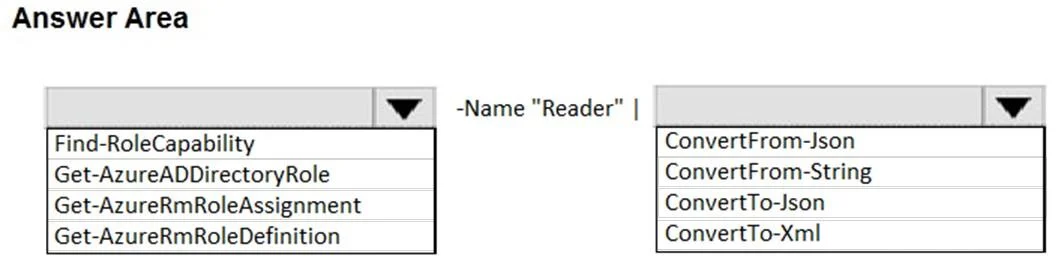
Case Study 3 - Contoso, Ltd Overview Contoso, Ltd. is a consulting company that has a main office in Montreal and two branch offices in Seattle and New York. The Montreal office has 2,000 employees. The Seattle office has 1,000 employees. The New York office has 200 employees. All the resources used by Contoso are hosted on-premises. Contoso creates a new Azure subscription. The Azure Active Directory (Azure AD) tenant uses adomain named contoso.onmicrosoft.com. The tenant uses the P1 pricing tier. Existing Environment The network contains an Active Directory forest named contoso.com. All domain controllers are configured as DNS servers and host the contoso.com DNS zone. Contoso has finance, human resources, sales, research, and information technology departments. Each department has an organizational unit (OU) that contains all the accounts of that respective department. All the user accounts have the department attribute set to their respective department. New users are added frequently. Contoso.com contains a user named User1. All the offices connect by using private links. Contoso has data centers in the Montreal and Seattle offices. Each data center has a firewall that can be configured as a VPN device. All infrastructure servers are virtualized. The virtualization environment contains the servers in the following table. Contoso uses two web applications named App1 and App2. Each instance on each web application requires 1GB of memory. The Azure subscription contains the resources in the following table. The network security team implements several network security groups (NSGs). Planned Changes Contoso plans to implement the following changes: - Deploy Azure ExpressRoute to the Montreal office. - Migrate the virtual machines hosted on Server1 and Server2 to Azure. - Synchronize on-premises Active Directory to Azure Active Directory (Azure AD). - Migrate App1 and App2 to two Azure web apps named WebApp1 and WebApp2. Technical requirements Contoso must meet the following technical requirements: - Ensure that WebApp1 can adjust the number of instances automatically based on the load and can scale up to five instances. - Ensure that VM3 can establish outbound connections over TCP port 8080 to the applications servers in the Montreal office. - Ensure that routing information is exchanged automatically between Azure and the routers in the Montreal office. - Ensure Azure Multi-Factor Authentication (MFA) for the users in the finance department only. - Ensure that webapp2.azurewebsites.net can be accessed by using the name app2.contoso.com - Connect the New York office to VNet1 over the Internet by using an encrypted connection. - Create a workflow to send an email message when the settings of VM4 are modified. - Create a custom Azure role named Role1 that is based on the Reader role. - Minimize costs whenever possible. Hotspot Question You need to implement Role1. Which command should you run before you create Role1? To answer, select the appropriate options in the answer area. NOTE: Each correct selection is worth one point. Answer:
This hotspot question tests knowledge of Azure AD Connect configuration and hybrid identity setup for Contoso, Ltd., which needs to synchronize its on-premises Active Directory (contoso.com) with Azure AD (contoso.onmicrosoft.com) while supporting dynamic group membership and scoped synchronization.
Approach. The correct approach involves configuring Azure AD Connect with the appropriate sync options: using 'Organizational Unit-based filtering' to scope synchronization to specific OUs (e.g., per department), enabling 'Password Hash Synchronization' or 'Pass-through Authentication' for hybrid sign-in, and leveraging Azure AD P1 features like 'Dynamic User Groups' based on the department attribute already populated in on-premises AD. For dynamic groups, the membership rule would use the 'department' attribute (e.g., (user.department -eq 'Finance')) which gets synchronized from on-premises AD via Azure AD Connect. Since the tenant is P1, dynamic membership groups are supported. User1 in contoso.com would be synchronized to Azure AD, and group memberships would be dynamically assigned based on their department attribute value.
Concept tested. Azure AD Connect hybrid identity synchronization, OU-based filtering, dynamic group membership rules using synchronized attributes (department), and Azure AD P1 licensing capabilities for dynamic groups and conditional access in a hybrid environment.