
AZ-104 · Question #348
Hotspot Question You have an Azure subscription named Subscription1 that contains the following resource group: - Name: RG1 - Region: West US - Tag: "tag1": "value1" You assign an Azure policy named…
The correct answer is Tags assigned to RG1:: "tag1": "value1" and "tag2": "value2"; Tags assigned to storage1:: "tag1": "value1", "tag2": "value2", and "tag3": "value3". Azure Policy's 'Append' effect only applies during resource creation or update, meaning the existing resource group retains only its original tags, while the newly created storage account receives both its explicitly assigned tags and the appended tags without inheriting the…
Question
Exhibits
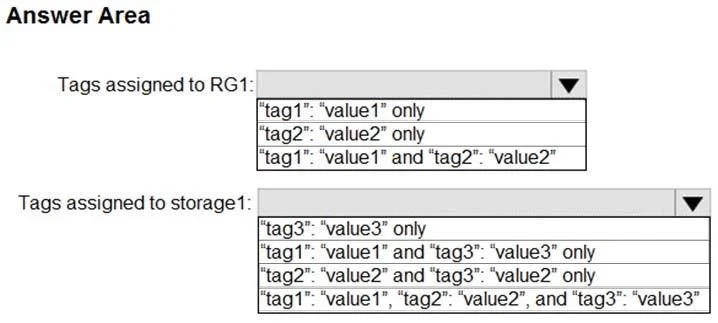
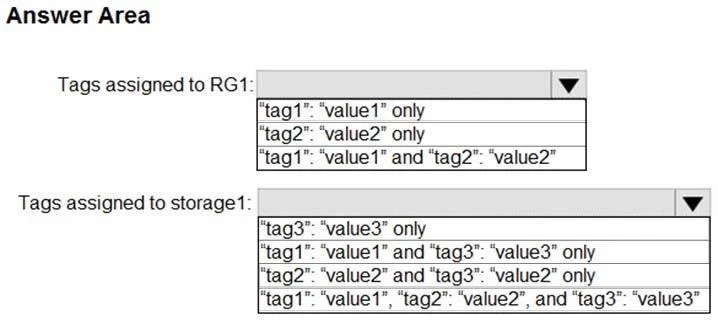
Answer Area
- Tags assigned to RG1:"tag1": "value1" and "tag2": "value2""tag1": "value1" only"tag2": "value2" only"tag1": "value1" and "tag2": "value2"
- Tags assigned to storage1:"tag1": "value1", "tag2": "value2", and "tag3": "value3""tag3": "value3" only"tag1": "value1" and "tag3": "value3" only"tag2": "value2" and "tag3": "value2" only"tag1": "value1", "tag2": "value2", and "tag3": "value3"
Explanation
Azure Policy's 'Append' effect only applies during resource creation or update, meaning the existing resource group retains only its original tags, while the newly created storage account receives both its explicitly assigned tags and the appended tags without inheriting the resource group's tags.
Approach. For Tags assigned to RG1: Select '"tag1": "value1" only'. The 'Append' policy effect evaluates resources during their creation or update. It does not retroactively apply to existing resources unless a remediation task is explicitly triggered. Since RG1 existed before the policy was assigned and hasn't been updated, its tags remain completely unchanged.
For Tags assigned to storage1: Select the option containing 'tag2' and 'tag3' (the third option, typically written as '"tag2": "value2" and "tag3": "value3" only'). Azure resources do not inherit tags from their parent resource group by default, meaning tag1 is not applied to the storage account. When storage1 is created, it is explicitly assigned tag3. Because it is a new resource, the assigned Azure Policy triggers and appends Tag2. Therefore, the storage account ends up with both tag2 and tag3.
Common mistakes.
- common_mistake. The provided solution image incorrectly highlights '"tag1": "value1" and "tag3": "value3" only' for storage1. This is a very common error in unofficial practice tests. It incorrectly assumes that Azure resources automatically inherit tags from their Resource Group (they do not). To inherit tags, a completely different built-in policy ('Inherit a tag from the resource group') would need to be applied. The 'Append' policy in this scenario specifically adds 'Tag2'.
Concept tested. Azure Policy Effects (Append) and Azure Resource Manager Tagging rules (lack of default inheritance)
Reference. https://learn.microsoft.com/en-us/azure/governance/policy/concepts/effects#append
Topics
Community Discussion
No community discussion yet for this question.