
AZ-104 · Question #222
Case Study 3 - Contoso, Ltd Overview Contoso, Ltd. is a consulting company that has a main office in Montreal and two branch offices in Seattle and New York. The Montreal office has 2,000 employees…
To set up Azure Site Recovery for on-premises Hyper-V VMs, you must first create a Recovery Services vault in the Azure portal and then install the Azure Site Recovery Provider on the on-premises Hyper-V host server.
Question
Exhibit
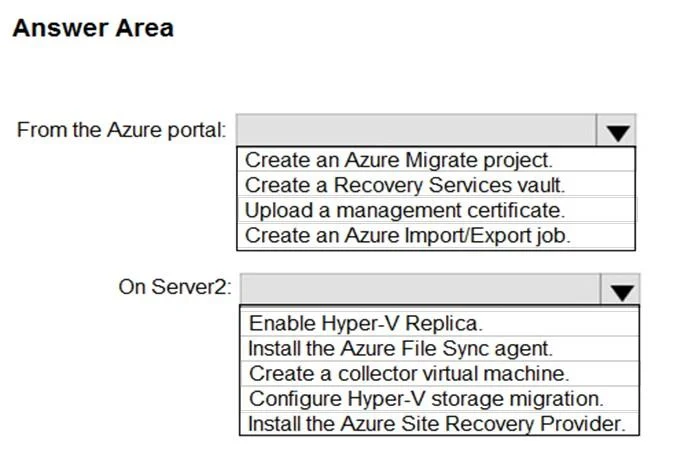
Answer Area
- From the Azure portal:Create an Azure Migrate project.Create a Recovery Services vault.Upload a management certificate.Create an Azure Import/Export job.
- On Server2:Enable Hyper-V Replica.Install the Azure File Sync agent.Create a collector virtual machine.Configure Hyper-V storage migration.Install the Azure Site Recovery Provider.
Explanation
To set up Azure Site Recovery for on-premises Hyper-V VMs, you must first create a Recovery Services vault in the Azure portal and then install the Azure Site Recovery Provider on the on-premises Hyper-V host server.
Approach. Based on the case study stating 'All infrastructure servers are virtualized' and the options provided, the most fitting scenario is setting up Azure Site Recovery (ASR) for disaster recovery or migration of on-premises Hyper-V virtual machines to Azure.
- From the Azure portal: The initial step for any Azure Site Recovery deployment is to create a Recovery Services vault. This vault acts as a central repository for replication settings and recovery plans.
- On Server2: Since Server2 is an on-premises server in a Hyper-V environment, and the goal is to replicate Hyper-V VMs to Azure using ASR, the necessary component to install on the Hyper-V host (Server2) is the Azure Site Recovery Provider. This agent facilitates communication between the on-premises Hyper-V host and Azure, enabling replication of VMs.
Common mistakes.
- common_mistake. Other options are incorrect because they address different functionalities or outdated methods:
-
Azure portal - Create an Azure Migrate project: While Azure Migrate can orchestrate ASR for migration, the direct container for ASR operations is the Recovery Services vault. An Azure Migrate project is for broader discovery and assessment.
-
Azure portal - Upload a management certificate: This method is deprecated and was primarily used for classic Azure deployments, not for modern Azure Site Recovery setups.
-
Azure portal - Create an Azure Import/Export job: This service is for large-scale data transfer of files and blobs using physical drives, not for continuous replication of virtual machines.
-
On Server2 - Enable Hyper-V Replica: This is an on-premises disaster recovery feature for replicating VMs between Hyper-V hosts locally, not to Azure.
-
On Server2 - Install the Azure File Sync agent: This agent is used to synchronize file shares with Azure Files, unrelated to VM replication.
-
On Server2 - Create a collector virtual machine: This is typically associated with Azure Migrate for discovery and assessment of on-premises environments, not the agent for actual VM replication.
-
On Server2 - Configure Hyper-V storage migration: This is an on-premises Hyper-V operation to move VM storage within or between Hyper-V hosts, not related to Azure replication.
Concept tested. Initial setup and architectural components of Azure Site Recovery (ASR) for on-premises Hyper-V virtual machines, specifically understanding the roles of the Recovery Services vault in Azure and the Azure Site Recovery Provider on Hyper-V hosts.
Topics
Community Discussion
No community discussion yet for this question.