
AZ-104 · Question #112
Hotspot Question You have an Azure subscription named Subscription1. Subscription1 contains the virtual machines in the following table. Subscription1 contains a virtual network named VNet1 that has…
The correct answer is Network traffic from VM3 can reach VM1. = Yes; If VM3 is turned off, network traffic from VM2 can reach VM1. = No; Network traffic from VM1 can reach VM2. = Yes. Custom route tables directing traffic to a Network Virtual Appliance (NVA) override default system routes, meaning traffic routing through the NVA will fail if the appliance is powered off.
Question
Exhibit
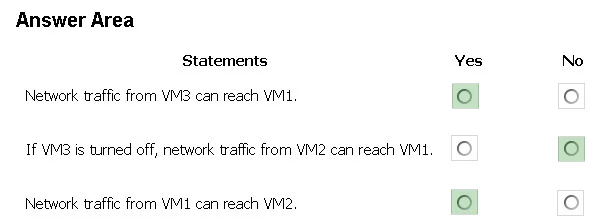
Answer Area
- Network traffic from VM3 can reach VM1.Yes
- If VM3 is turned off, network traffic from VM2 can reach VM1.No
- Network traffic from VM1 can reach VM2.Yes
Explanation
Custom route tables directing traffic to a Network Virtual Appliance (NVA) override default system routes, meaning traffic routing through the NVA will fail if the appliance is powered off.
Approach. 1. 'Network traffic from VM3 can reach VM1' (Yes): VM3 is acting as the NVA. Because its subnet does not have the UDR applied (which would create a routing loop), it uses the default VNet system route to communicate directly with VM1. 2. 'If VM3 is turned off, network traffic from VM2 can reach VM1' (No): The route table (RT1) associated with Subnet2 explicitly directs traffic to VM3 as the Next Hop. If VM3 is turned off, the traffic drops because the specified next hop is unavailable. 3. 'Network traffic from VM1 can reach VM2' (Yes): Traffic from VM1 is routed by RT1 to VM3. Since VM3 has both Azure-level IP forwarding enabled on its NIC and OS-level routing enabled, it successfully accepts and forwards the packets to VM2.
Common mistakes.
- common_mistake. A common misconception is that if an NVA (the next hop) is powered off or fails, Azure will automatically ignore the User-Defined Route (UDR) and fall back to the default VNet local routing. In reality, a matching UDR always overrides the default system route; if the next hop is dead, the traffic is simply dropped.
Concept tested. Azure Virtual Network Routing, User-Defined Routes (UDRs), IP Forwarding, and Network Virtual Appliances (NVAs).
Reference. https://learn.microsoft.com/en-us/azure/virtual-network/virtual-networks-udr-overview
Topics
Community Discussion
No community discussion yet for this question.