
800-150 · Question #80
Drag and Drop Question Drag and drop the Cisco collaboration components from the left onto the corresponding descriptions on the right. Answer:
The correct answer is edge devices; conferencing; call control; endpoints; collaboration applications. Cisco Collaboration Components - Drag-and-Drop Explained > Note: The right-side descriptions weren't included in the question text, but the correct matching follows the standard Cisco Collaboration architecture. Here's what each component maps to and why. --- 1. Edge Devices…
Question
Drag and Drop Question Drag and drop the Cisco collaboration components from the left onto the corresponding descriptions on the right. Answer:
Exhibit
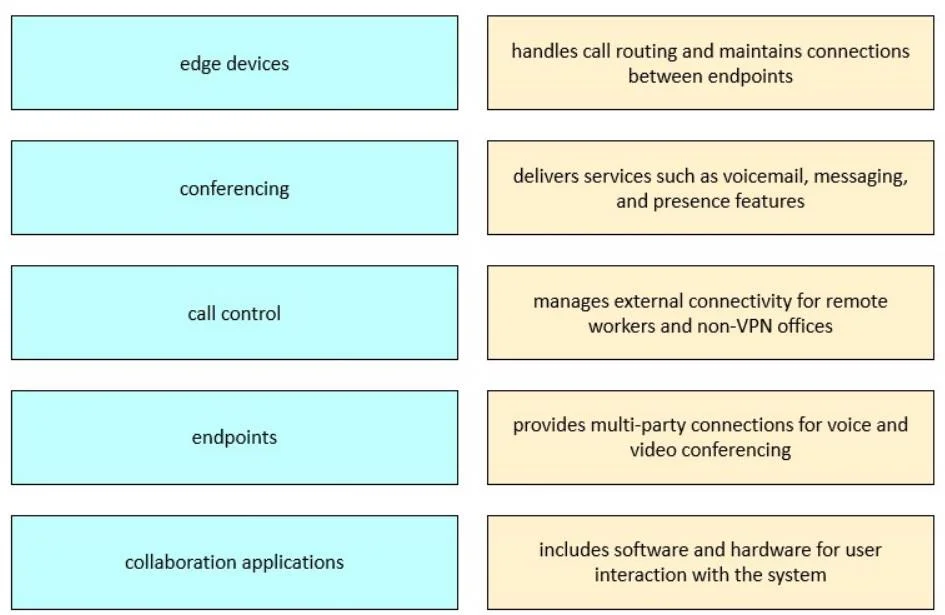
Answer Area
Drag items
Correct arrangement
- edge devices
- conferencing
- call control
- endpoints
- collaboration applications
Explanation
Cisco Collaboration Components - Drag-and-Drop Explained
Note: The right-side descriptions weren't included in the question text, but the correct matching follows the standard Cisco Collaboration architecture. Here's what each component maps to and why.
1. Edge Devices
What it is: Components that sit at the network boundary to enable secure communication across untrusted networks (internet, partner networks).
Examples: Cisco Expressway-C/E, CUBE (Cisco Unified Border Element)
Why it's #1: Edge devices are the outermost layer - they handle firewall traversal, remote access, and B2B federation before traffic ever reaches internal infrastructure.
2. Conferencing
What it is: Infrastructure that bridges multiple participants into a single audio/video/web conference.
Examples: Cisco Meeting Server (CMS), Webex Conferencing
Why it's #2: Conferencing sits adjacent to call control but is a distinct infrastructure layer - it's a resource that call control routes to, not part of the routing engine itself.
3. Call Control
What it is: The core signaling engine that registers endpoints, routes calls, and enforces dial plans.
Examples: Cisco Unified Communications Manager (CUCM), Cisco UCM Cloud
Why it's #3: Call control is the central hub of the entire architecture. Everything else either registers with it, gets routed through it, or depends on it.
4. Endpoints
What it is: The user-facing devices used to place and receive calls.
Examples: Cisco IP Phones (8800/9800 series), Webex Room devices, Cisco Jabber (soft client)
Why it's #4: Endpoints register to call control - they are consumers of the infrastructure, not providers of it.
5. Collaboration Applications
What it is: Software layers providing UC features beyond basic calling - voicemail, IM/presence, contact center, recording.
Examples: Cisco Unity Connection, IM&P Service, Webex App, Finesse (contact center)
Why it's #5: These are value-added application services that sit on top of the core infrastructure.
Common Misconceptions
| Mistake | Correction |
|---|---|
| Confusing endpoints with collaboration apps | Endpoints are hardware/soft-phones; apps are services like voicemail or IM |
| Treating call control and conferencing as the same | CUCM routes calls; CMS/Webex bridges multiple parties - separate systems |
| Placing edge devices last | Edge is always the perimeter/boundary layer - it comes first architecturally |
| Thinking Jabber/Webex App = endpoints only | They are also collaboration apps - they bundle calling + messaging + presence |
The architecture flows logically: Edge → Conferencing resources → Call Control (core) → Endpoints (users) → Applications (services).
Topics
Community Discussion
No community discussion yet for this question.