
800-150 · Question #89
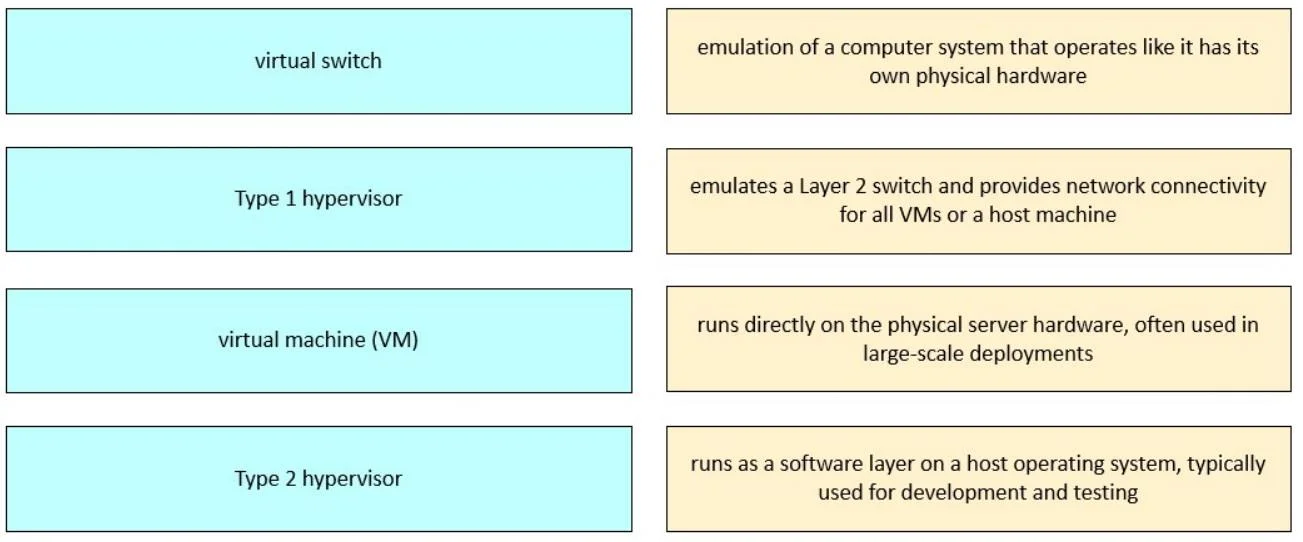
Drag and Drop Question Drag and drop the virtualized data center components from the left onto the corresponding descriptions on the right. Answer:
The correct answer is virtual machine (VM); virtual switch; Type 1 hypervisor; Type 2 hypervisor. Virtualized Data Center Components - Explanation The question matches each component to its description. Here's why each item belongs in its position: --- Position 1 → Virtual Machine (VM) A VM is a software emulation of a physical computer. It runs its own OS and applications…
Question
Drag and Drop Question Drag and drop the virtualized data center components from the left onto the corresponding descriptions on the right. Answer:
Exhibit
Answer Area
Drag items
Correct arrangement
- virtual machine (VM)
- virtual switch
- Type 1 hypervisor
- Type 2 hypervisor
Explanation
Virtualized Data Center Components - Explanation
The question matches each component to its description. Here's why each item belongs in its position:
Position 1 → Virtual Machine (VM)
A VM is a software emulation of a physical computer. It runs its own OS and applications in an isolated environment, sharing the underlying physical hardware through a hypervisor.
Why here: VMs are the end-user-facing abstraction - the "workload" that everything else exists to support. They're the most fundamental concept to define first.
Position 2 → Virtual Switch (vSwitch)
A virtual switch is a software-defined Layer 2 networking component that allows VMs to communicate with each other and with external networks - mimicking a physical Ethernet switch entirely in software.
Common misconception: Students sometimes confuse this with a physical switch or forget it exists at all. VMs need network connectivity too, and vSwitches provide it without physical hardware.
Position 3 → Type 1 Hypervisor (Bare-Metal)
Runs directly on physical hardware with no host OS underneath. It has direct hardware access and is the foundation for enterprise/production virtualization.
Examples: VMware ESXi, Microsoft Hyper-V, Citrix Hypervisor.
Common misconception: Students think Type 1 requires an OS to boot into - it doesn't. It is effectively the OS layer.
Position 4 → Type 2 Hypervisor (Hosted)
Runs on top of an existing host OS (e.g., Windows, macOS, Linux). It relies on the host OS for hardware access, adding a layer of overhead.
Examples: VMware Workstation, Oracle VirtualBox, Parallels Desktop.
Common misconception: Confusing Type 1 and Type 2 is the most frequent error. The key differentiator is simple: Type 1 = no host OS (bare metal); Type 2 = sits on top of a host OS.
Quick Memory Aid
| Component | Key Trait |
|---|---|
| VM | The guest - runs apps/OS |
| Virtual Switch | Software networking for VMs |
| Type 1 Hypervisor | Bare metal - no host OS |
| Type 2 Hypervisor | Hosted - needs a host OS |
Topics
Community Discussion
No community discussion yet for this question.