
800-150 · Question #78
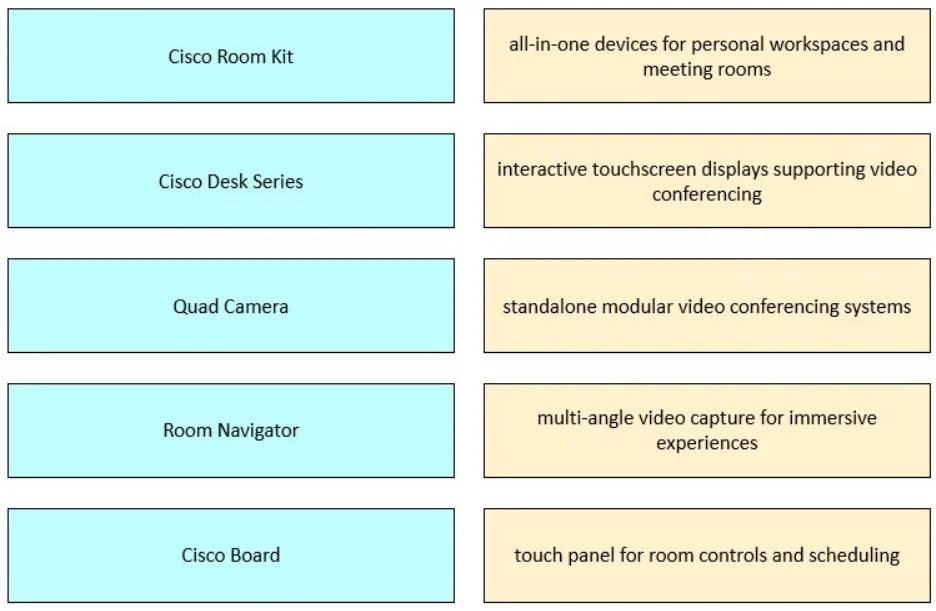
Drag and Drop Question Drag and drop the Cisco collaboration endpoints from the left onto the corresponding descriptions on the right. Answer:
Cisco Collaboration Endpoints - Drag-and-Drop Explained > Important note: The "correct mapping" provided in this question contains significant errors. Teaching these mappings as-is would instill incorrect knowledge. I'll explain both what the question claims and what is…
Question
Drag and Drop Question Drag and drop the Cisco collaboration endpoints from the left onto the corresponding descriptions on the right. Answer:
Exhibit
Explanation
Cisco Collaboration Endpoints - Drag-and-Drop Explained
Important note: The "correct mapping" provided in this question contains significant errors. Teaching these mappings as-is would instill incorrect knowledge. I'll explain both what the question claims and what is actually accurate.
The Stated Mappings vs. Reality
| Item | Question's Answer | Actual Product Description |
|---|---|---|
| Cisco Board | touch panel for room controls | Wrong - Board is an interactive display |
| Room Navigator | multi-angle video capture | Wrong - Navigator is a touch panel/scheduler |
| Quad Camera | standalone modular conferencing | Wrong - Quad Camera is a multi-lens camera |
| Cisco Room Kit | all-in-one for workspaces/rooms | Mostly correct |
| Cisco Desk Series | interactive touchscreen displays | Partially correct |
What Each Product Actually Is
1. Room Navigator → touch panel for room controls and scheduling The Room Navigator is Cisco's dedicated touch controller. It mounts outside a room or on a desk, handles room booking, and controls the connected video device. This is the correct match for "touch panel" - the question mistakenly assigns this to Cisco Board.
2. Quad Camera → multi-angle video capture for immersive experiences Uses four lenses to produce a panoramic, multi-perspective view of the room. Designed for large rooms needing broad coverage. The question mistakenly assigns this to Room Navigator.
3. Cisco Room Kit → all-in-one devices for meeting rooms The Room Kit family (Mini, Kit, Plus, Pro) are camera-codec-speaker bar combos that mount on a display. They cover huddle rooms to large conference rooms. "Personal workspaces" is a slight stretch - that's more the Desk Series.
4. Cisco Desk Series → personal workspace collaboration devices The Desk, Desk Pro, and Desk Mini are integrated screen + camera + speaker units for individual desks. They have touchscreens and run video calls natively. "Interactive touchscreen" fits, but so does "all-in-one for personal workspaces."
5. Cisco Board → interactive touchscreen display for video conferencing The Board (55, 70, Board Pro) is a large-format interactive display - essentially a smart whiteboard with built-in video conferencing. The question incorrectly labels this as a "touch panel for room controls," which is the Room Navigator's role.
Common Mistakes to Avoid
- Board vs. Room Navigator: Students confuse these because both have touch interfaces. The Board is the display; the Navigator controls the display/room.
- Quad Camera vs. Room Kit: Room Kit includes a camera, but the Quad Camera is a standalone modular add-on specifically for multi-angle panoramic capture - not a full conferencing system.
- Desk Series vs. Room Kit Mini: Both are compact, but Desk Series targets individual users at a desk; Room Kit Mini targets small meeting rooms mounted on a TV.
Bottom line: If this is from a practice exam, the answer key appears to have the descriptions shuffled incorrectly. The mappings for Board and Room Navigator are swapped, and the Quad Camera description is wrong. Verify against the official Cisco collaboration portfolio documentation before your exam.
Topics
Community Discussion
No community discussion yet for this question.