
800-150 · Question #71
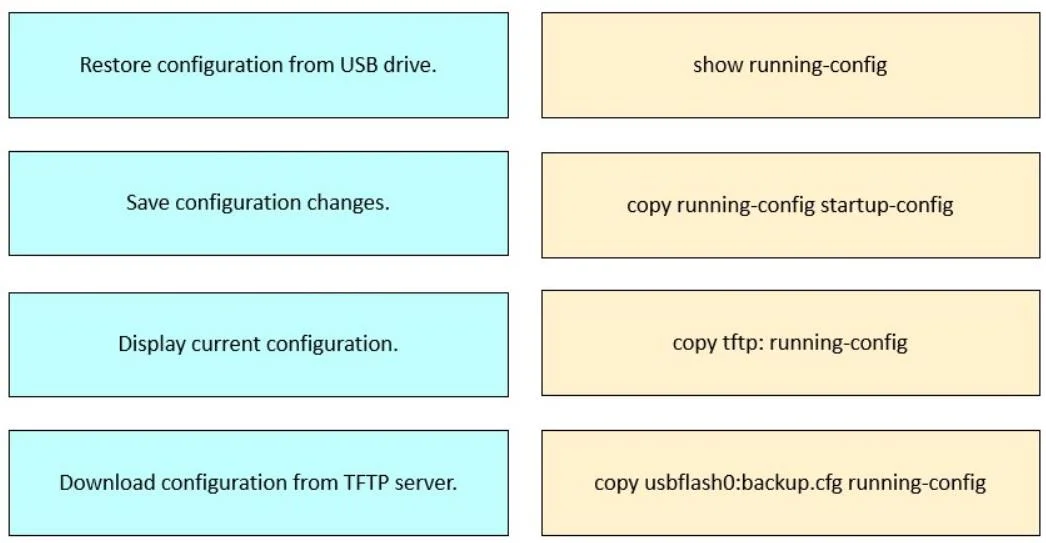
Drag and Drop Question Drag and drop the configuration tasks for restoring software from the left onto the corresponding commands on the right. Answer:
The correct answer is copy usbflash0:backup.cfg running-config; copy running-config startup-config; show running-config; copy tftp: running-config. Cisco IOS Configuration Command Matching This question tests knowledge of Cisco IOS copy and show commands for managing device configurations. --- The Correct Matches 1. copy usbflash0:backup.cfg running-config → Restore configuration from USB drive copy syntax is always copy…
Question
Drag and Drop Question Drag and drop the configuration tasks for restoring software from the left onto the corresponding commands on the right. Answer:
Exhibit
Answer Area
Drag items
Correct arrangement
- copy usbflash0:backup.cfg running-config
- copy running-config startup-config
- show running-config
- copy tftp: running-config
Explanation
Cisco IOS Configuration Command Matching
This question tests knowledge of Cisco IOS copy and show commands for managing device configurations.
The Correct Matches
1. copy usbflash0:backup.cfg running-config → Restore configuration from USB drive
copy syntax is always copy <source> <destination>. Here, usbflash0:backup.cfg is the source (a file on the USB flash drive) and running-config is the destination (active configuration in RAM). This merges the file into the running config, effectively restoring it.
2. copy running-config startup-config → Save configuration changes
This is the standard "save" command. It copies the active running config (in RAM) to startup-config (in NVRAM), so changes persist after a reboot. Without this, any changes are lost on restart.
3. show running-config → Display current configuration
show commands are read-only - they display information without modifying anything. show running-config outputs the currently active configuration in RAM.
4. copy tftp: running-config → Download configuration from TFTP server
Same copy <source> <destination> logic as #1. The source is tftp: (a TFTP server - the IOS CLI will prompt for the server IP and filename), and the destination is running-config.
Common Mistakes
| Mistake | Why It's Wrong |
|---|---|
Confusing copy running-config startup-config with "restore" | This saves, not restores - direction matters |
Swapping source/destination in copy commands | copy tftp: running-config pulls from TFTP; reversing it would push to TFTP |
Thinking show modifies anything | show is always read-only |
Confusing running-config (RAM) and startup-config (NVRAM) | Running = active now; startup = loads on boot |
Key mental model: copy <from> <to> - always read left to right as "copy FROM → TO."
Topics
Community Discussion
No community discussion yet for this question.