
800-150 · Question #70
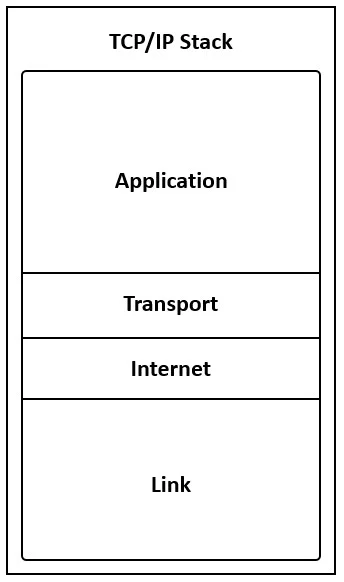
Drag and Drop Question Refer to the exhibit. Drag and drop the steps in the TCP/IP encapsulation process from the left onto the corresponding layer on the right. Answer:
The correct answer is adds a header to the user data; groups the data into segments and adds a header; groups the transport data into packets, adding a network header; groups the data into frames, adding a header and FCS trailer. TCP/IP Encapsulation: Layer-by-Layer Explanation The four steps map to the four layers of the TCP/IP model, top-down, as data travels from the application toward the physical medium. --- The Correct Order (Top → Bottom) | # | Step | TCP/IP Layer | |---|------|-------------| | 1…
Question
Drag and Drop Question Refer to the exhibit. Drag and drop the steps in the TCP/IP encapsulation process from the left onto the corresponding layer on the right. Answer:
Exhibit
Answer Area
Drag items
Correct arrangement
- adds a header to the user data
- groups the data into segments and adds a header
- groups the transport data into packets, adding a network header
- groups the data into frames, adding a header and FCS trailer
Explanation
TCP/IP Encapsulation: Layer-by-Layer Explanation
The four steps map to the four layers of the TCP/IP model, top-down, as data travels from the application toward the physical medium.
The Correct Order (Top → Bottom)
| # | Step | TCP/IP Layer |
|---|---|---|
| 1 | adds a header to the user data | Application |
| 2 | groups the data into segments and adds a header | Transport |
| 3 | groups the transport data into packets, adding a network header | Internet (Network) |
| 4 | groups the data into frames, adding a header and FCS trailer | Network Access (Data Link) |
Why Each Item Goes Where It Does
1. "adds a header to the user data" → Application Layer
The Application layer is the entry point for user-generated data. Protocols like HTTP, DNS, and FTP prepend a protocol-specific header to raw user data. No segmentation or addressing happens yet - this is the simplest form of encapsulation. The result is called data or a message.
2. "groups the data into segments and adds a header" → Transport Layer
The keyword here is segments - the protocol data unit (PDU) unique to the Transport layer (TCP). TCP breaks the application data into manageable chunks and adds a header containing source/destination port numbers, sequence numbers, and acknowledgment numbers. UDP calls its PDU a datagram, but the concept is the same. Nothing below this layer uses the term "segment."
3. "groups the transport data into packets, adding a network header" → Internet Layer
The keyword is packets - the PDU of the Internet/Network layer. IP takes the transport segment and encapsulates it into a packet by adding a header with source and destination IP addresses. Notice the description says "network header," confirming this is the layer responsible for logical addressing and routing.
4. "groups the data into frames, adding a header and FCS trailer" → Network Access Layer
Two clues identify this as the bottom layer:
- "frames" - the PDU of the Data Link / Network Access layer, containing MAC addresses in the header.
- "FCS trailer" - the Frame Check Sequence is a CRC value appended at the end of the frame for error detection. This is the only layer in the TCP/IP model that adds a trailer, not just a header.
Common Mistakes and Misconceptions
| Mistake | Correction |
|---|---|
| Confusing packets and segments | Segments = Transport; Packets = Network. These terms are not interchangeable on an exam. |
| Forgetting the FCS trailer | Students often think encapsulation only adds headers. The Data Link layer is unique in adding a trailer as well. |
| Skipping the Application layer | The Application layer does encapsulate - it adds a protocol header to user data. It's easy to think encapsulation only starts at Transport. |
| Mixing OSI and TCP/IP layers | In OSI there are 7 layers; in TCP/IP there are 4. "Network Access" in TCP/IP combines OSI's Data Link and Physical layers. Don't apply OSI numbering to a TCP/IP question. |
| Reversing the order | Encapsulation goes down (Application → Network Access). De-encapsulation on the receiving end goes up. |
The mnemonic: Each layer wraps the layer above it - like envelopes within envelopes. The PDU names (data → segment → packet → frame) are the fastest way to identify which layer is being described on an exam.
Topics
Community Discussion
No community discussion yet for this question.