800-150 · Question #68
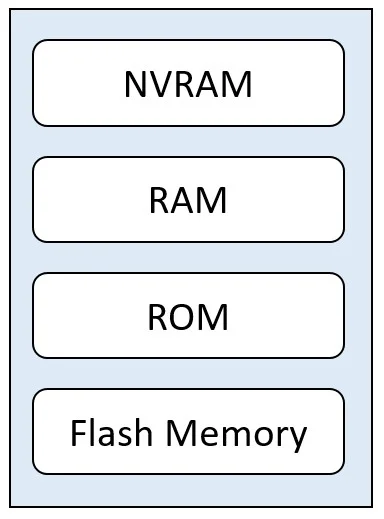
Drag and Drop Question Refer to the exhibit. Drag and drop the functions from the left onto the corresponding internal memory components on the right. Answer:
The correct answer is bootstrap code, post code, ROM monitor; startup configuration; running configuration; Cisco IOS software, backup configuration. Cisco Router Memory Components - Drag & Drop Explanation This question maps software/data types to the four internal memory components of a Cisco router. The four memory slots are ROM, NVRAM, RAM, and Flash, in that order. --- 1. bootstrap code, POST code, ROM monitor → ROM ROM…
Question
Drag and Drop Question Refer to the exhibit. Drag and drop the functions from the left onto the corresponding internal memory components on the right. Answer:
Exhibit
Answer Area
Drag items
Correct arrangement
- bootstrap code, post code, ROM monitor
- startup configuration
- running configuration
- Cisco IOS software, backup configuration
Explanation
Cisco Router Memory Components - Drag & Drop Explanation
This question maps software/data types to the four internal memory components of a Cisco router. The four memory slots are ROM, NVRAM, RAM, and Flash, in that order.
1. bootstrap code, POST code, ROM monitor → ROM
ROM (Read-Only Memory) is permanent, non-volatile chip memory written at the factory. It contains:
- POST (Power-On Self Test): hardware diagnostics that run first at boot
- Bootstrap code: the minimal loader that finds and loads the IOS image
- ROM monitor (ROMmon): a low-level recovery environment used when IOS can't load
These must live in ROM because the router needs them before any other memory is accessible.
Common mistake: Confusing ROM monitor with Flash. ROMmon is a fallback mode, not the full IOS - it lives in ROM, not Flash.
2. startup configuration → NVRAM
NVRAM (Non-Volatile RAM) retains its contents after a power cycle. The startup config (startup-config) is saved here so the router can restore its configuration on reboot.
Common mistake: Confusing startup-config with running-config. Startup-config is the saved version; it does nothing until the router reboots and loads it into RAM.
3. running configuration → RAM
RAM is volatile - it loses its contents on power loss. The running config (running-config) is the active, live configuration being used right now. All routing tables, ARP caches, and packet buffers also live here.
Common mistake: Thinking that changes to the running config are permanent. They are not - you must copy running-config startup-config to persist them to NVRAM.
4. Cisco IOS software, backup configuration → Flash
Flash memory is non-volatile and stores the full IOS image file (e.g., c2900-universalk9-mz.SPA.157-3.M.bin). It can also hold a backup/secondary IOS image.
Common mistake: Placing IOS in ROM. ROM only holds the bootstrap loader that finds IOS - the full IOS image is too large for ROM and lives in Flash.
Quick Reference Table
| Memory | Volatile? | Stores |
|---|---|---|
| ROM | No | POST, bootstrap, ROMmon |
| NVRAM | No | startup-config |
| RAM | Yes | running-config, routing tables |
| Flash | No | IOS image, backup IOS |
The boot sequence flows: ROM → Flash → NVRAM → RAM, which is exactly the order these items load during startup.
Topics
Community Discussion
No community discussion yet for this question.
