
800-150 · Question #67
Drag and Drop Question Drag and drop the network connectivity and management tools used to ensure connectivity from the left onto the description on the right. Answer:
The correct answer is PING; Telnet; SSH; IP address configuration. Network Connectivity & Management Tools - Drag-and-Drop Explained > Note: The right-side descriptions weren't included in your question, but the correct arrangement follows a logical connectivity troubleshooting and management progression, which I'll explain below. --- The…
Question
Drag and Drop Question Drag and drop the network connectivity and management tools used to ensure connectivity from the left onto the description on the right. Answer:
Exhibit
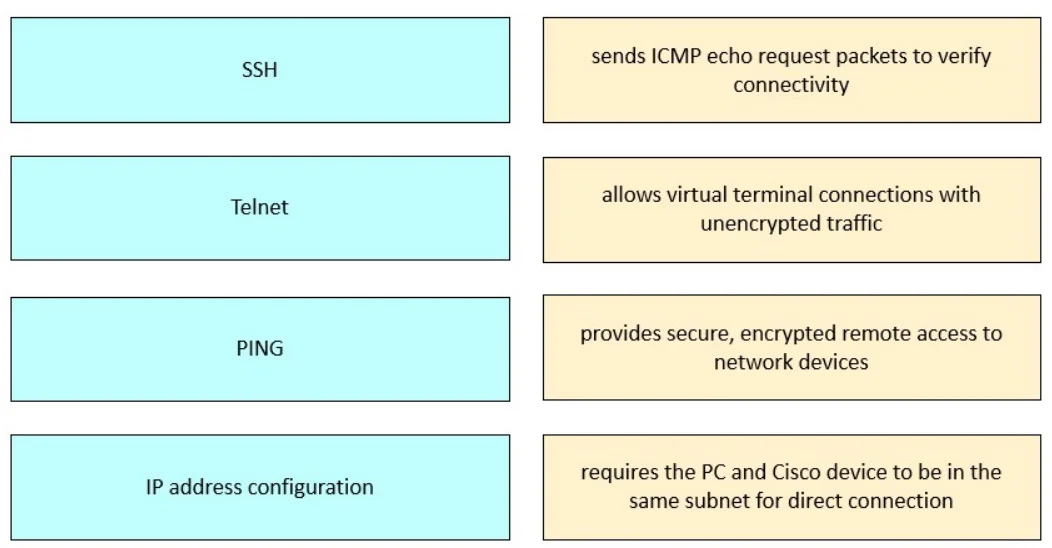
Answer Area
Drag items
Correct arrangement
- PING
- Telnet
- SSH
- IP address configuration
Explanation
Network Connectivity & Management Tools - Drag-and-Drop Explained
Note: The right-side descriptions weren't included in your question, but the correct arrangement follows a logical connectivity troubleshooting and management progression, which I'll explain below.
The Logic of the Arrangement
The ordering moves from basic reachability testing → unsecured remote access → secured remote access → foundational configuration, reflecting a layered approach to network connectivity.
Item-by-Item Breakdown
1. PING
- Why it's first: PING uses ICMP echo requests to verify a host is reachable at the network layer. It's the first diagnostic step - if you can't ping a device, nothing else matters.
- Technical reason: Operates at Layer 3 (Network). No credentials needed; purely tests if an IP path exists.
- Common misconception: Thinking a failed ping means the device is down - firewalls often block ICMP, giving false negatives.
2. Telnet
- Why it's second: Once reachability is confirmed, Telnet tests application-layer (Layer 7) remote access on port 23.
- Technical reason: Transmits all data, including credentials, in plaintext. Still used in labs/legacy environments to verify remote CLI access is functioning.
- Common misconception: Confusing Telnet with SSH - they both provide remote CLI access, but Telnet has zero encryption.
3. SSH (Secure Shell)
- Why it's third: SSH is the secure replacement for Telnet, operating on port 22 with full encryption (asymmetric key exchange + symmetric session encryption).
- Technical reason: Provides the same remote management capability as Telnet but protects credentials and session data in transit.
- Common misconception: Thinking SSH and Telnet are interchangeable in production - Telnet is a security risk and should never be used over untrusted networks.
4. IP Address Configuration
- Why it's last: This is the foundational prerequisite - without a properly configured IP address, none of the above tools work.
- Technical reason: Assigns a Layer 3 address (and subnet mask/gateway) to a network interface. Every other tool depends on this being correct first.
- Common misconception: Students often think troubleshooting starts here, when in fact on exams, it's listed as a configuration output rather than a diagnostic step - hence its placement after the diagnostic tools.
Key Takeaway
| # | Tool | Purpose | Layer |
|---|---|---|---|
| 1 | PING | Test reachability | L3 |
| 2 | Telnet | Unencrypted remote access | L7 |
| 3 | SSH | Encrypted remote access | L7 |
| 4 | IP Config | Enable communication | L3 |
The progression tests whether connectivity exists before establishing how to manage it securely.
Topics
Community Discussion
No community discussion yet for this question.