
Microsoft
70-778 · Question #78
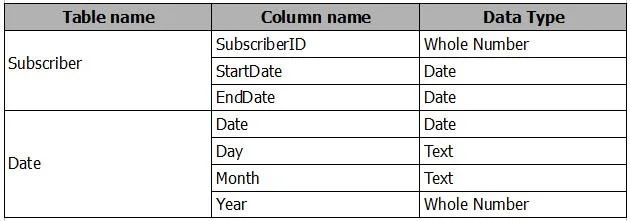
You have the following tables. There is a many-to-one relationship from Subscriber to Date that uses Subscriber[StartDate] and Date[Date]. The Cross filter direction of the relationship is set to…
The correct answer is D. Create an inactive many-to-one relationship from Subscriber[StartDate] to Date[Date]. First create inactive relation M-1 from subscriber[EndDate] to Date[Date]. Then Use USERELATIONSHIP in calculcate count() https://docs.microsoft.com/en-us/power-bi/desktop-create-and-manage-relationships
Model and Visualize Data by Using Power BI Desktop
Question
You have the following tables. There is a many-to-one relationship from Subscriber to Date that uses Subscriber[StartDate] and Date[Date]. The Cross filter direction of the relationship is set to Single. You plan to create a column chart that displays the following two measures: - Count of SubscriberID by Month based on the StartDate - Count of SubscriberID by Month based on the EndDate What should you do before you create the measures?
Exhibit
Options
- ACreate an active one-to-one relationship from Subscriber[StartDate] to Date[Date].
- BChange the Cross filter direction of the active relationship to Both.
- CChange the active relationship for many-to-one.
- DCreate an inactive many-to-one relationship from Subscriber[StartDate] to Date[Date].
How the community answered
(40 responses)- A8% (3)
- B3% (1)
- C10% (4)
- D80% (32)
Explanation
First create inactive relation M-1 from subscriber[EndDate] to Date[Date]. Then Use USERELATIONSHIP in calculcate count() https://docs.microsoft.com/en-us/power-bi/desktop-create-and-manage-relationships
Topics
#inactive relationships#USERELATIONSHIP#date table#multiple date columns
Community Discussion
No community discussion yet for this question.