
Microsoft
70-778 · Question #77
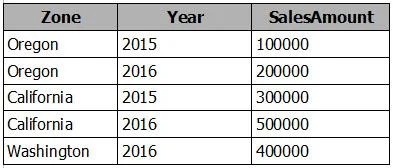
You have a table named Sales that contains sales data for the United States. A sample of the data in Sales is shown in the following table. When you attempt to create a map that shows SalesAmount by…
The correct answer is C. Select the Zone field. From the Modeling tab, change the Data Category. https://docs.microsoft.com/en-us/power-bi/guided-learning/visualizations#step-5
Model and Visualize Data by Using Power BI Desktop
Question
You have a table named Sales that contains sales data for the United States. A sample of the data in Sales is shown in the following table. When you attempt to create a map that shows SalesAmount by Zone, you discover that the map shows a bubble based on cities instead of states. You need to ensure that the map shows bubbles based on states. What should you do?
Exhibit
Options
- AAdd a column named Country that contains United States as the value.
- BAdd a column for longitude and a column for latitude.
- CSelect the Zone field. From the Modeling tab, change the Data Category.
- DSelect the Zone field. From the Modeling tab, change the Data Type.
How the community answered
(48 responses)- A4% (2)
- B13% (6)
- C79% (38)
- D4% (2)
Explanation
https://docs.microsoft.com/en-us/power-bi/guided-learning/visualizations#step-5
Topics
#data category#map visualization#geographic data#state vs city
Community Discussion
No community discussion yet for this question.