
Microsoft
70-778 · Question #70
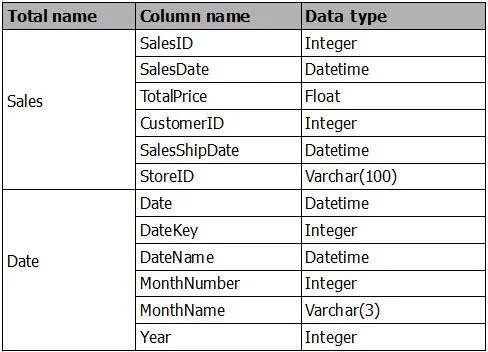
You are creating a report in Power BI Desktop. You are consuming the following tables. You have a new table named Fiscal that has the same schema as the Date table, but contains the fiscal dates of…
The correct answer is D. Merge Fiscal into the Date table. https://docs.microsoft.com/en-us/power-bi/desktop-shape-and-combine-data
Model and Visualize Data by Using Power BI Desktop
Question
You are creating a report in Power BI Desktop. You are consuming the following tables. You have a new table named Fiscal that has the same schema as the Date table, but contains the fiscal dates of your company. You need to create a report that displays the total sales by fiscal month and calendar month. What should you do?
Exhibit
Options
- AUnion Fiscal and Date as one table.
- BAdd Fiscal to the model and create a one-to-many relationship by using Date[Year] and
- CAdd Fiscal to the model and create a one-to-one relationship by using Date[Year] and
- DMerge Fiscal into the Date table.
How the community answered
(34 responses)- A3% (1)
- B6% (2)
- C9% (3)
- D82% (28)
Explanation
https://docs.microsoft.com/en-us/power-bi/desktop-shape-and-combine-data
Topics
#table merging#fiscal calendar#data modeling#query editor
Community Discussion
No community discussion yet for this question.