
Microsoft
70-778 · Question #151
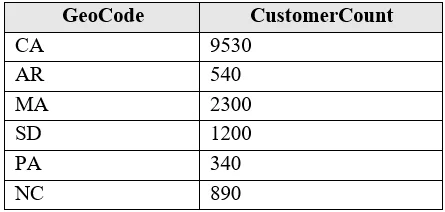
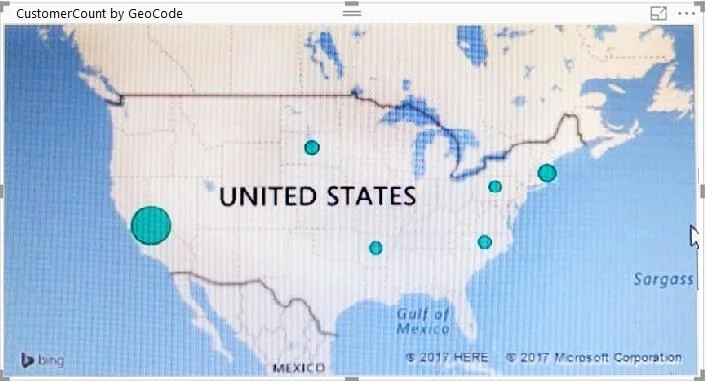
You have the following table named Location. The GeoCode column represents the country where each customer is located. You create a map visualization as shown in the exhibit. (Click the Exhibit…
The correct answer is B. Change the name of the GeoCode column to Country. https://docs.microsoft.com/en-us/power-bi/visuals/power-bi-map-tips-and-tricks
Model and Visualize Data by Using Power BI Desktop
Question
You have the following table named Location. The GeoCode column represents the country where each customer is located. You create a map visualization as shown in the exhibit. (Click the Exhibit tab.) You need to ensure that the map displays the country locations. What should you do?
Exhibits
Options
- AReplace the values in the GeoCode column with postal codes or zip codes.
- BChange the name of the GeoCode column to Country.
- CChange the name of the Location table to Country.
- DChange the Default Summarization of the GeoCode column.
- EAdd a Geoportal column to the Location table.
- FChange the Data Type of the GeoCode column.
How the community answered
(41 responses)- A15% (6)
- B73% (30)
- C2% (1)
- D7% (3)
- E2% (1)
Explanation
https://docs.microsoft.com/en-us/power-bi/visuals/power-bi-map-tips-and-tricks
Topics
#map visualization#geospatial data#column naming#data categorization
Community Discussion
No community discussion yet for this question.