
70-663 · Question #198
A corporate environment includes Exchange Server 2010. Client computers run Windows 7 and Microsoft Outlook 2010. The client computers are joined to an Active Directory Domain Services (AD DS)…
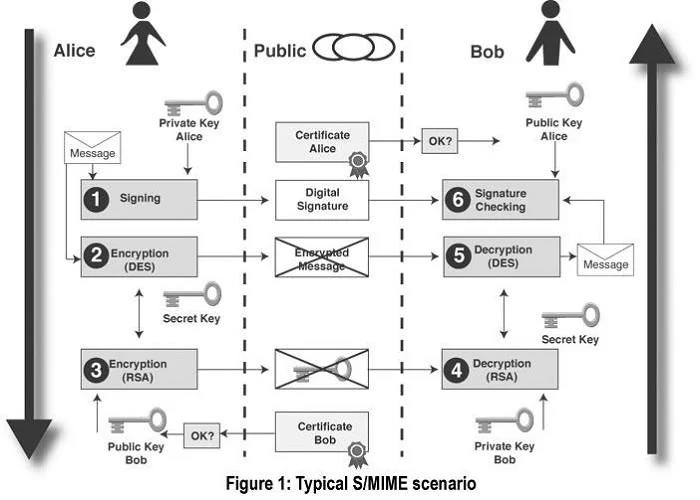
The correct answer is C. Secure/Multipurpose Internet Mail Extensions (S/MIME). S/MIME lets users encrypt outgoing messages and attachments so that only intended recipients who have a digital identification (ID), also known as a certificate, can read them. With S/MIME, users can digitally sign a message, which provides the recipients with a way to verify…
Question
A corporate environment includes Exchange Server 2010. Client computers run Windows 7 and Microsoft Outlook 2010. The client computers are joined to an Active Directory Domain Services (AD DS) domain. You need to recommend an email security solution that meets the following requirements:
- Protect email messages from being read by unauthorized users.
- Protect attachments, including text files, PDF files, and XPS files.
- Encrypt selected email messages when they are sent.
What should you recommend?
Exhibit
Options
- Amessage classification
- BMutual Transport Layer Security (MTLS)
- CSecure/Multipurpose Internet Mail Extensions (S/MIME)
- DActive Directory Rights Management Services (AD RMS)
How the community answered
(30 responses)- A7% (2)
- B3% (1)
- C77% (23)
- D13% (4)
Explanation
S/MIME lets users encrypt outgoing messages and attachments so that only intended recipients who have a digital identification (ID), also known as a certificate, can read them. With S/MIME, users can digitally sign a message, which provides the recipients with a way to verify the identity of the sender and that the message hasn't been tampered with. Any email client that supports S/MIME will provide both signing and encryption as simple checkbox or icons you can toggle on or off as seen in the example screenshots. Unlike a digital signature alone, you can only send an encrypted email to a recipient whose public key you already have received. Otherwise your email client will display a warning that the message cannot be encrypted. You can receive the recipient's public key by asking them to first send you an email that they have digitally signed.
Topics
Community Discussion
No community discussion yet for this question.